If Yahoo Mail shows 3.8 GB / 3 GB in a red banner, check the deadline and start making space. The reported notice gives users 17 days to act and names December 9, 2026, as the cutoff. If your mailbox is still full after that date, Yahoo can block outgoing mail and reject new messages. Your existing emails stay in your active account.

Yahoo cut free storage from 1 TB to 20 GB in 2025. It has now begun rolling out a 3 GB limit in select markets, including the Philippines. The rollout is gradual, so check the quota and deadline displayed in your own inbox. Yahoo’s Philippine storage guide confirms the 3 GB allowance and explains what happens when your mailbox fills up.
What Happens After December 9?
A Full Mailbox Stops Sending and Receiving
If December 9 is your cutoff and your mailbox is still full, Yahoo blocks outgoing messages. Incoming messages bounce back to the sender. You can still open existing emails and attachments in your active account. Clearing space or buying more storage lets you send and receive new mail again.
⚠️ Warning: If you’re still above 3 GB after your December 9 cutoff, Yahoo rejects incoming mail. That includes banking one-time passwords (OTPs) delivered by email and password reset messages. Yahoo does not store rejected messages, so you cannot recover them later. Users have also reported fake “Yahoo Storage Full” phishing emails. Never click links in storage warning emails. Type mail.yahoo.com directly into your browser, sign in, and check the storage widget inside your account.
After clearing space, send a test message to a second email address you control. Reply from that address and confirm the reply lands in Yahoo Mail. Ask anyone who received a bounce to resend their message. If you missed a verification code or password reset, request a fresh one through the service’s official app or website.
How to Free Up Yahoo Mail Storage Fast
Start With the Largest Attachments
Open Yahoo Mail on a desktop browser and check the storage meter. If it shows 3.8 GB / 3 GB, aim to clear more than 0.8 GB. That puts you below the cap and leaves room for new messages. A batch of large PDFs or photos can free more space than hundreds of short emails.
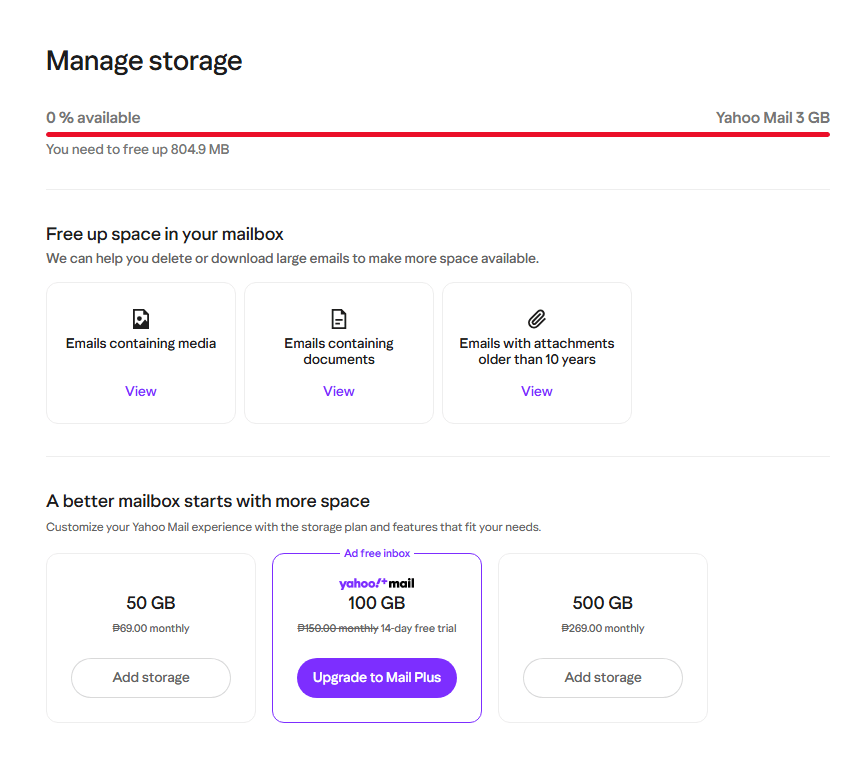
💡 Pro-Tip: Open Manage Storage from the in-account banner if the button appears, or type has:attachment into the search bar. Start with emails carrying multi-megabyte PDFs or photos you already have elsewhere. Save anything important and open the saved copy before deleting the message. Empty Trash afterward. Messages in Trash still count toward your quota until you permanently remove them.
- Sort by size. In New Yahoo Mail, open the All tab and choose Preferences → Sort by → Largest first. Yahoo sorts by total message size, including attachments. If the search operator misses messages, choose Preferences → More filters → Has attachment.
- Check Sent and custom folders. Copies of reports, scanned documents, and photos you sent also use storage. Use Advanced Search to narrow your results by folder, sender, subject, or date range. Start with older files you can verify you already saved.
- Save the full email when context matters. A downloaded PDF preserves the file. If you need the sender, date, or conversation for a receipt or dispute, back up the full message before deleting it.
- Review Trash and Spam before clearing them. Move messages you want to keep out of Trash. Then open More → Trash, select the items to purge, and choose Delete → Yes, delete. Check Spam for legitimate mail before clearing confirmed junk.
- Recheck your usage. Return to the storage meter after each large batch. Once you have enough room, confirm that you can send and receive mail.
If the largest messages contain records you still need, pause the cleanup and make a local archive. You can keep years of email on your computer and remove the verified copies from Yahoo later.
How to Back Up or Migrate Your Yahoo Emails Safely
Back Up Yahoo Mail for Free With Mozilla Thunderbird
You can download Mozilla Thunderbird for free and use it to archive Yahoo messages and attachments. The process has two parts. First, download the mail through IMAP. Then copy it into Thunderbird’s Local Folders so your archive can survive deletions from Yahoo’s servers.
⚠️ Warning: Do not bulk-delete messages from Yahoo until your local Thunderbird archive has fully downloaded or your cloud migration has finished. Check that older messages and attachments open from the copy. IMAP deletions can sync back to Yahoo and across devices. If you plan to stop using Yahoo, update your recovery email with your banks, GCash, and social media accounts. Verify each change while you can still access your Yahoo inbox.
- Add Yahoo Mail to Thunderbird. Enter your Yahoo address and choose IMAP. When Thunderbird opens Yahoo’s sign-in page, complete the OAuth2 sign-in there. If your client requires password-based sign-in, follow Yahoo’s app password instructions. Open Yahoo Account Security → External connections → Create app password and use the generated password in the client. For manual IMAP setup, use
imap.mail.yahoo.com, port 993, with SSL/TLS. - Download complete messages. Open Account Settings → Synchronization & Storage and enable Keep messages for this account on this computer. Check the folders and subfolders you want, including Inbox, Sent, Archive, and any custom folders. Give Thunderbird time to finish downloading bodies and attachments.
- Copy messages into Local Folders. Create folders under Local Folders and copy your Yahoo messages into them. Keep the originals on Yahoo while you verify the archive. The local copies remain available independently of the Yahoo account’s synchronized folders.
- Test the archive offline. Disconnect from the internet and open several old messages and attachments from Local Folders. Include samples from your earliest and most important folders. Then close Thunderbird and copy its profile to a separate drive. Thunderbird’s built-in ZIP export supports up to 2 GB. Copy the profile manually if it exceeds that limit.
Move Messages and Contacts to Gmail or Outlook.com
To move to Gmail, open Settings → See all settings → Accounts and Import → Import mail and contacts. Follow Google’s instructions for importing mail and contacts. Check that the oldest messages and key attachments arrived. If you need to copy individual folders, add both accounts to Thunderbird and copy messages to Gmail in batches.
For Outlook.com, add Yahoo and your destination Outlook.com account to classic Outlook for Windows. Copy Yahoo messages into folders under the Outlook.com account. Once syncing finishes, sign in to Outlook.com in a browser and check that the messages and attachments are there.
You can also export a CSV file from Yahoo Contacts. Import it into Google Contacts for Gmail or People in Outlook.com. Check a few important entries for correct names, email addresses, and phone numbers. Before switching, tell frequent contacts where to reach you and change the address on accounts that send important notices.
Yahoo Mail Paid Plans vs. Free Competitors
If you regularly use your Yahoo address and need its full archive online, paid storage may save you a migration. Yahoo’s Philippine Help Center lists 50 GB and 500 GB storage plans and 100 GB with Yahoo Mail Plus. Check Yahoo Mail’s storage subscription page while signed in to see the plans and prices available to your account.
| Provider | Free Storage Cap | How Storage Is Shared | Best For |
|---|---|---|---|
| Yahoo Mail Free | 3 GB for affected accounts | Yahoo messages and attachments use the mailbox allowance | Keeping your Yahoo address with a smaller inbox |
| Yahoo Mail Paid Add-On | 3 GB on the free tier. 50 GB or 500 GB paid plans where offered | The paid plan increases storage for Yahoo mail and attachments | Keeping a large archive in your Yahoo mailbox |
| Gmail Free | 15 GB | Shared across Gmail, Google Drive, and Google Photos | Readers with room left in their Google storage |
| Outlook.com Free | 15 GB dedicated email storage | Outlook.com attachments also count toward a separate 5 GB Microsoft cloud allowance | Readers who want a dedicated email quota |
Check your available space before migrating. Photos and Drive files may already use much of Gmail’s shared allowance. On Outlook.com, check both the mailbox meter and the separate Microsoft cloud storage limit, especially if your archive contains many attachments.
Conclusion
Open Yahoo Mail directly and check the storage meter today. If your banner shows December 9, verify your backup and get below 3 GB before the cutoff. If you’re switching providers, test your new inbox and update your recovery addresses before retiring Yahoo. Share this guide with anyone who still relies on Yahoo Mail for bills, school, or work.