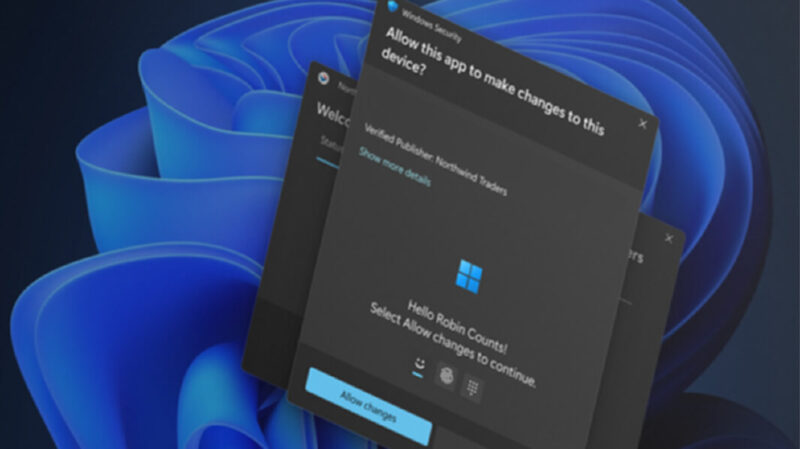
In today’s threat environment, traditional administrative prompts no longer offer sufficient security for modern endpoints. Consequently, Microsoft introduced a new security paradigm to strengthen local system permissions. Specifically, you can now Enable Administrator Protection Windows 11 to harden your system against credential theft. Moreover, updating your Windows 11 security settings gives you granular control over administrative actions. In this guide, we will explore how this feature replaces legacy prompts with biometrics. For nearly two decades, User Account Control served as the primary defense against unauthorized software changes. However, legacy UAC… Read More
Posts in Enterprise IT
Microsoft Upgrades All M365 Business Mailboxes to 100GB Storage at No Extra Cost
IT administrators across the globe can finally take a deep breath. Microsoft has officially rolled out a massive Microsoft 365 mailbox storage boost for small and medium-sized enterprise tenants. Consequently, millions of users will see their base primary cloud email storage instantly double. Microsoft is increasing standard allocations from 50GB to a massive 100GB limit. Best of all, this huge infrastructure update arrives completely free of charge for qualifying subscriptions. As digital communication expands, inbox sizes naturally grow faster than ever. Modern workflows rely heavily on massive file attachments, integrated… Read More
Restrict Copilot Agents SharePoint Access
Microsoft 365 Copilot brings remarkable productivity gains to modern organizations. However, autonomous agents can quickly expose sensitive enterprise data if your security controls remain lax. Many IT teams discover that autonomous AI agents index confidential financial records, salary spreadsheets, and strategic plans unexpectedly. Consequently, securing your document libraries has become a top priority for digital workplaces. Effective Microsoft 365 Copilot governance prevents unauthorized AI data retrieval across your entire tenant. Meanwhile, proper SharePoint site permissions ensure that autonomous agents only access authorized corporate data. Therefore, administrators must implement strict access… Read More
How to Disable Windows 11 Recall AI Snapshots
Microsoft recently introduced Windows 11 Recall AI to enhance search capabilities across Copilot+ PCs. However, this feature continuously captures screenshots and creates a comprehensive digital timeline of your desktop activity. Consequently, many users want to disable Windows 11 Recall to safeguard sensitive personal data and business documents. In fact, storing unencrypted or local activity logs raises serious security concerns among enterprise IT administrators. Fortunately, you can take total control over your device privacy today. Specifically, Microsoft offers several methods to pause, sandbox, or completely erase these background AI tracking systems…. Read More
Windows 11 Adds Native Post-Quantum Security APIs
Quantum computing promises incredible breakthroughs for medicine and artificial intelligence. However, it also poses a massive threat to modern digital security. Adversaries can eventually break standard public-key algorithms like RSA and ECC using quantum power. To counter this, Microsoft introduced native post-quantum security APIs into Windows 11. This update enables developers and IT leaders to start building quantum-safe cryptography right into enterprise applications today. The threat is not decades away. Cybercriminals currently intercept and store encrypted enterprise data in large-scale storage hubs. This strategy is known as a “Harvest Now,… Read More
SharePoint File Archiving: How to Cut Storage Costs
The High Cost of Cold Data Organizations generate immense volumes of digital documents every working day. Consequently, IT administrators face expanding SharePoint storage costs across their enterprise environments. Active cloud storage provides incredible speed and collaboration capabilities for modern teams. However, keeping legacy documents in active storage tiers wastes significant operating budget. In response, Microsoft introduced granular SharePoint file archiving within the Microsoft 365 Archive platform. Previously, IT teams could only archive complete SharePoint site collections. Now, admins can target specific cold files within active team sites. Therefore, companies retain… Read More
Gartner 2026 Report: Enterprise Spending on Domain-Specific AI Models Surges 210% as CFOs Audit Cloud Costs
Enterprise artificial intelligence strategy is undergoing a massive structural transformation in 2026. For two years, corporate technology budgets flowed heavily toward massive, general-purpose foundation models. Today, however, enterprise technology decision-makers are pivoting toward specialized architecture. Recent research from Gartner’s AI Spending Forecast highlights a dramatic shift in capital allocation. Chief Financial Officers are aggressively auditing cloud bills and demanding predictable returns on investment. Consequently, enterprise spending on domain-specific AI models is skyrocketing across global markets. This comprehensive technical analysis explores why organizations are abandoning bloated general-purpose models. Furthermore, we examine… Read More
How to Configure Windows 11 “Quick Machine Recovery” (QMR) for Remote System Repair
System administrators remember catastrophic boot outages with intense frustration. For example, flawed kernel driver updates can instantly paralyze thousands of endpoint devices. Consequently, IT teams must manually physically touch each broken workstation. That manual recovery process burns hundreds of expensive engineering hours. Microsoft addresses this massive operational vulnerability with Windows 11 Quick Machine Recovery. This groundbreaking system provides reliable QMR remote system repair capabilities directly over your network. Furthermore, system resilience has become a top operational priority for modern remote workforces. When a remote laptop crashes in another country, shipping… Read More
Microsoft Bundles Defender for Office 365 and Intune P2 into Core M365 Tiers: What It Means for IT Budgets
Managing enterprise cloud subscriptions often feels like a constant game of moving target costs. Recently, major M365 licensing updates altered how organizations structure their modern digital workplace. Microsoft is now bundling Microsoft Defender for Office 365 Plan 1 alongside Intune Plan 2 into core commercial subscriptions. Specifically, plans like Microsoft 365 E3 receive these built-in security and management tools at no extra standalone cost. Historically, sysadmins had to purchase separate add-on licenses to gain advanced phishing protection and advanced device capabilities. Consequently, IT leaders can now eliminate overlapping third-party software… Read More
Recover Files from Purview DLP Quarantine in SharePoint
Data security remains a top priority for IT organizations today. Consequently, administrators rely on automated tools to protect sensitive business information. Specifically, Microsoft Purview DLP actively scans document libraries in SharePoint Online. It continuously monitors files for credit card numbers, tax identifiers, and intellectual property. However, security policies sometimes trigger unexpectedly. As a result, valid business documents vanish instantly from shared document libraries. Microsoft Purview moves those items into an isolated location for analysis. Therefore, learning how to recover files from Purview DLP quarantine becomes an essential skill for system… Read More