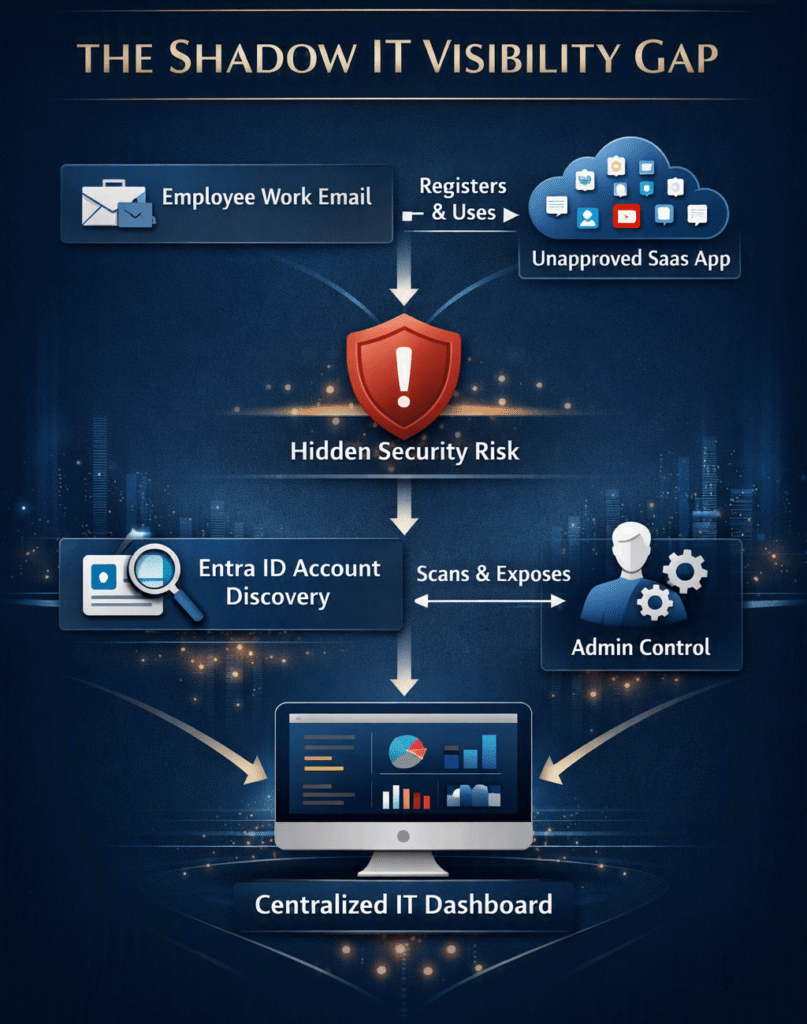
Modern enterprises face a silent identity management crisis today. Employees constantly adopt new software-as-a-service platforms to speed up daily workflows. However, workers rarely consult IT departments before signing up for these digital tools. They use corporate email addresses to register on unsanctioned websites. Therefore, administrators lose sight of corporate credentials across the web. Security experts call this pervasive operational phenomenon shadow IT.
Unmonitored cloud applications introduce massive security gaps into your infrastructure. Microsoft recently launched Microsoft Entra ID Account Discovery to solve this exact problem. This powerful tool directly exposes shadow IT risk management vulnerabilities across enterprise environments. Furthermore, it surfaces hidden unmanaged app credentials linked to company domains. Today on TechnicalForum.org, we explore how this feature secures modern cloud identity security workflows.
Understanding the Growing Threat of Shadow IT
Shadow IT creates immense operational drag on security teams. Employees frequently reuse corporate passwords on third-party web platforms. Consequently, a single data breach on an external website compromises enterprise networks. Attackers gather leaked credentials from dark web databases effortlessly. Then, they attempt credential stuffing attacks against your primary identity provider. Cloud identity security fails when identity teams lack visibility over external sign-ups.
Moreover, traditional monitoring tools often miss unapproved consumer accounts entirely. Standard firewalls track web traffic, but they cannot decipher specific account details. Web proxies log domain visits without identifying the exact user credential used. Therefore, administrators struggle to enforce standard security policies across third-party web tools. Security managers need continuous automated insights into external account creations.
Unmanaged accounts also complicate corporate offboarding processes significantly. When employees leave your company, IT revokes main directory access immediately. However, former workers retain access to external third-party software accounts. These unmonitored accounts contain sensitive corporate assets, client files, and confidential discussions. Thus, IT leaders must discover every single account linked to company emails.
How Microsoft Entra ID Account Discovery Operates
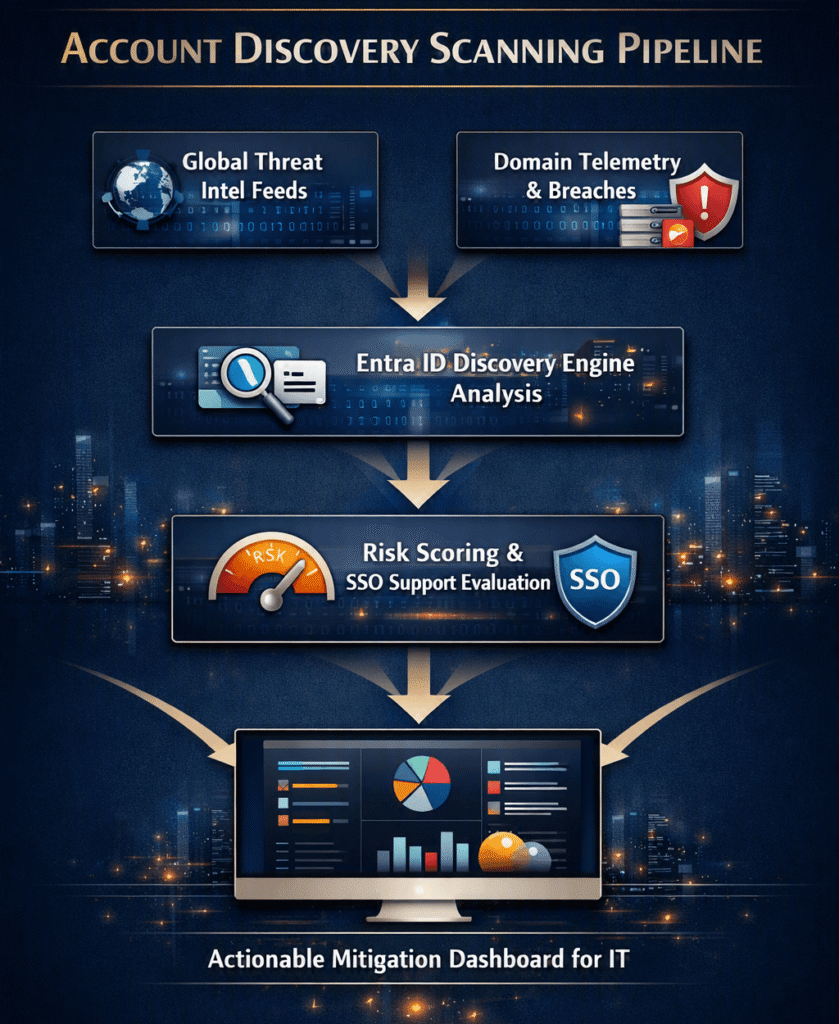
The new discovery system integrates seamlessly into the existing Microsoft Entra admin portal. First, the feature scans public data breaches and partner threat feeds automatically. It isolates external web accounts registered with your verified domain names. Next, the system cross-references these findings with your central identity directory. Administrators view comprehensive reports containing exposed services and impacted email addresses.
💡 Key Operational Takeaway: Account Discovery does not require invasive client-side agents on employee devices. Instead, it relies on global threat intelligence signals and federated telemetry to pinpoint unmanaged accounts across the web.
Additionally, the tool evaluates the threat level of every single discovered service. It checks whether external applications support modern single sign-on standards. Furthermore, it flags services that lack mandatory multi-factor authentication enforcement. Administrators prioritize mitigation steps based on actual security threat severity metrics. As a result, security operations teams save precious time during daily triage work.
The system also tracks emerging account registration trends over prolonged timeframes. For instance, it alerts managers when multiple teams adopt identical unapproved software. This data helps IT procurement teams negotiate better enterprise software licenses. Consequently, security tools provide clear business value alongside essential identity protection.
| Feature / Metric | Traditional Web Proxies | Entra ID Account Discovery |
| Visibility Scope | Network traffic on-premise | Global web logins & breach data |
| Agent Requirement | Requires device agents | Agentless cloud scanning |
| Account Resolution | Logs IP & Domain only | Identifies specific email accounts |
| SSO Remediation | Manual blocking | Direct SAML/OIDC integration |
Key Features of the Account Discovery Dashboard
The administrative dashboard acts as your central command hub for enterprise access management. First, the main interface presents a clean visual summary of total unmanaged applications. You can quickly filter results by specific departments, domains, or risk tiers. Furthermore, detailed views highlight high-risk services handling critical corporate communications.
Automated Risk Scoring for Unmanaged Apps
The dashboard assigns a dynamic risk score to every unapproved third-party vendor. This score considers historical data breach history and compliance certifications. Additionally, the system evaluates the vendor’s password strength requirements automatically. High-risk applications trigger immediate administrative alerts within the portal interface. Consequently, security staff address severe security vulnerabilities before attackers exploit them.
Consolidated User Activity Reporting
Administrators track specific user behavior trends across multiple external platforms effortlessly. The dashboard reveals which employees sign up for unmonitored SaaS solutions most frequently. However, the system respects employee privacy by focusing strictly on security metadata. It does not monitor personal browsing history or private messages. Instead, it isolates credential risks to keep company assets completely safe.
💡 Pro-Tip: Export your discovery logs toMicrosoft Sentinelroutinely. Combining identity telemetry with SIEM analytics helps you detect sophisticated multi-stage attacks across your environment.
+-----------------------------------------------------------------------+
|                   ENTRA ID DISCOVERY METRIC OVERVIEW                  |
|                                                                       |
|  [ TOTAL UNMANAGED APPS ]  [ HIGH-RISK VENDORS ] [ UNGOVERNED USERS ] |
|            142                        19                      385     |
|                                                                       |
|  Top Shadow Categories:                                               |
|  * AI Tools (45%)                                                     |
|  * File Sharing (30%)                                                 |
|  * Project Management (25%)                                           |
+-----------------------------------------------------------------------+
Step-by-Step Guide: Deploying Account Discovery
Deploying this capability requires minimal configuration effort from your administrative team. However, you must possess global administrator privileges inside your Entra tenant. Follow these direct steps to activate scanning across your organization efficiently:
1. Access the Entra Admin Center:Prerequisite: Global Admin Rights.
Navigate to the official portal using your administrative credentials. Ensure your subscription includes licenses for modern Microsoft Security tools.
2. Verify Domain Ownership:Required for accurate tenant scanning.
Check your custom domain configurations under the identity settings panel. Verify that all corporate primary and secondary email domains appear as validated. Unverified domains will skip the discovery scanning phase completely.
3. Enable Shadow IT Discovery Controls:Configuring intelligence parameters.
Locate the identity governance tab within the left navigation menu. Enable the account discovery scanning toggle to start ingesting global intelligence signals.
4. Set Up Risk Alert Thresholds:Automating security notifications.
Define custom notification rules based on threat severity scores. Configure automated email alerts for high-risk unmanaged app credentials detected during scans.
5. Review the Initial Baseline Report:Allow up to 24 hours for initial data population.
Open the discovery dashboard to evaluate your initial enterprise risk profile. Audit the findings thoroughly with your internal security operations team.
Strategic Benefits for Enterprise Security Teams
Implementing this identity solution provides immediate strategic advantages for growing modern companies. First, it bridges the historical communication gap between employees and IT managers. Rather than punishing workers for using helpful tools, IT brings those applications into governance. Security teams simply convert discovered accounts into official single sign-on integrations.
⚠️ Warning: Do not block discovered applications abruptly without offering employees functional alternatives. Outright bans usually force workers to use personal email accounts, creating deeper shadow IT blind spots.
Furthermore, centralized identity management streamlines your compliance auditing processes. Regulatory frameworks like ISO 27001 demand strict control over corporate data access points. Showing auditors complete visibility over SaaS application discovery simplifies annual certification reviews. You prove that your business actively monitors external identity risks continuous.
Finally, managing all applications centrally reduces corporate licensing costs over time. IT managers spot duplicate software subscriptions across different internal teams quickly. For instance, two departments might buy separate plans for identical graphic design software. Consolidating these subscriptions under enterprise agreements saves significant money annually.
Remediating Discovered Unmanaged Credentials
Discovery represents only the first phase of a successful identity management strategy. Once you identify shadow accounts, you must execute clear remediation workflows promptly. Microsoft Entra ID offers several automated options to resolve exposed credential risks.
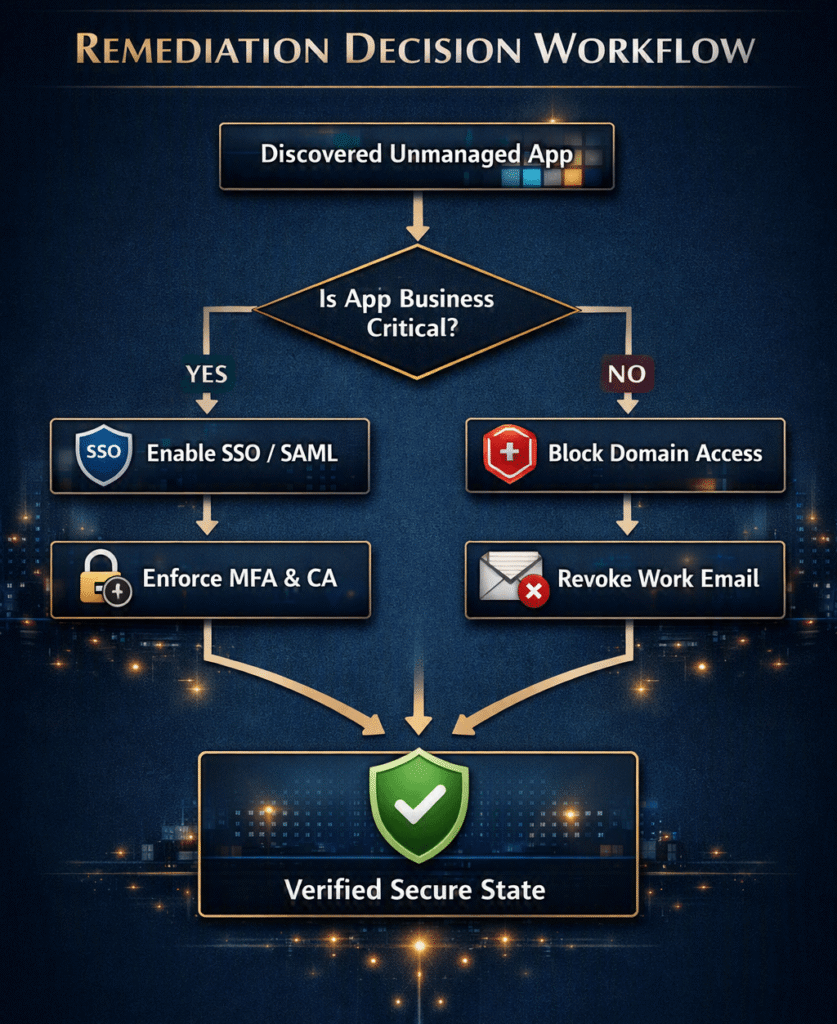
Here are the primary strategies for securing unmanaged app credentials:
- Enforce Single Sign-On (SSO): Migrate discovered applications to federated authentication using OIDC standard protocols. This completely eliminates separate passwords on external third-party servers.
- Apply Conditional Access Policies: Require mandatory multi-factor authentication whenever users log into critical third-party tools. Block logins originating from unverified devices or risky geographical locations.
- Block High-Risk Destinations: Block connections to malicious or non-compliant web destinations entirely using Microsoft Defender for Cloud Apps.
- Automate Account Provisioning: Implement automated SCIM user provisioning for popular cloud applications. Automatically deactivate external accounts the moment an employee leaves your organization.
Combining these remediation strategies ensures total control over your corporate identity perimeter. Furthermore, employees enjoy a smoother login experience through centralized enterprise single sign-on portals.
Future Outlook for Cloud Identity Security
The launch of Account Discovery marks a major shift in identity protection methodologies. Static perimeter defenses no longer protect modern organizations effectively in remote work environments. Identity serves as the primary security perimeter for modern digital organizations today. Therefore, identity tools must adapt dynamically to evolving employee habits across the web.
Looking forward, artificial intelligence will drive proactive identity remediation workflows automatically. Future Entra ID updates will likely negotiate SSO integrations with new vendors automatically. Additionally, machine learning algorithms will predict software adoption trends before registration spikes occur. Staying current with these identity management trends is essential for IT leaders worldwide. You can track ongoing identity security updates directly on the official CISA Cyber Infrastructure Portal.
Final Thoughts & Conclusion
Shadow IT poses a continuous challenge for security teams in fast-paced business environments. Employees will always seek efficient software tools to complete their daily tasks. However, unmonitored accounts expose corporate networks to catastrophic data breaches and identity theft. Microsoft Entra ID Account Discovery gives IT administrators the tools required to regain complete identity visibility.
By discovering unmanaged app credentials early, organizations eliminate security blind spots without hindering productivity. Implementing these proactive identity controls reinforces your overall security posture against modern cyber threats. We strongly encourage every IT administrator to test this powerful discovery feature today.
What Is Your Enterprise Shadow IT Strategy?
How is your IT team handling unapproved SaaS application usage this year? Have you discovered surprising shadow IT tools within your corporate network recently?
Drop your thoughts, experiences, and questions in the comments below! If you found this article helpful, please share it with your IT colleagues on LinkedIn and Twitter/X!