Time is running out for users running older builds. Microsoft recently confirmed that Windows 11 24H2 support reaches its final deadline on October 13, 2026 for Home and Pro editions. Therefore, millions of personal computers will soon stop receiving vital monthly security patches. Naturally, sysadmins and everyday consumers must decide on an upgrade strategy right away. Should you make the immediate jump to upgrade to Windows 11 25H2, or should you pivot directly to the newly released 26H2 update instead?
Understanding this decision requires a clear look at Microsoft’s update roadmap. Because the tech giant uses an annual release cycle, every major release carries a strict expiration timer. Consequently, delaying your system maintenance introduces unnecessary vulnerability to modern malware. In this complete guide, we will break down the timeline, evaluate your upgrade options, and explain how to smoothly transition your system without encountering disruptive OS crashes or unexpected downtime.
Understanding the Windows 11 Lifecycle Timeline
Microsoft maintains a rigid Windows 11 Lifecycle Policy for all desktop editions. Specifically, consumer editions like Home and Pro receive exactly 24 months of active monthly servicing. Conversely, Enterprise and Education SKUs enjoy 36 months of official support. However, once a version reaches its end of life, Microsoft cuts off non-security previews and critical bug fixes entirely.
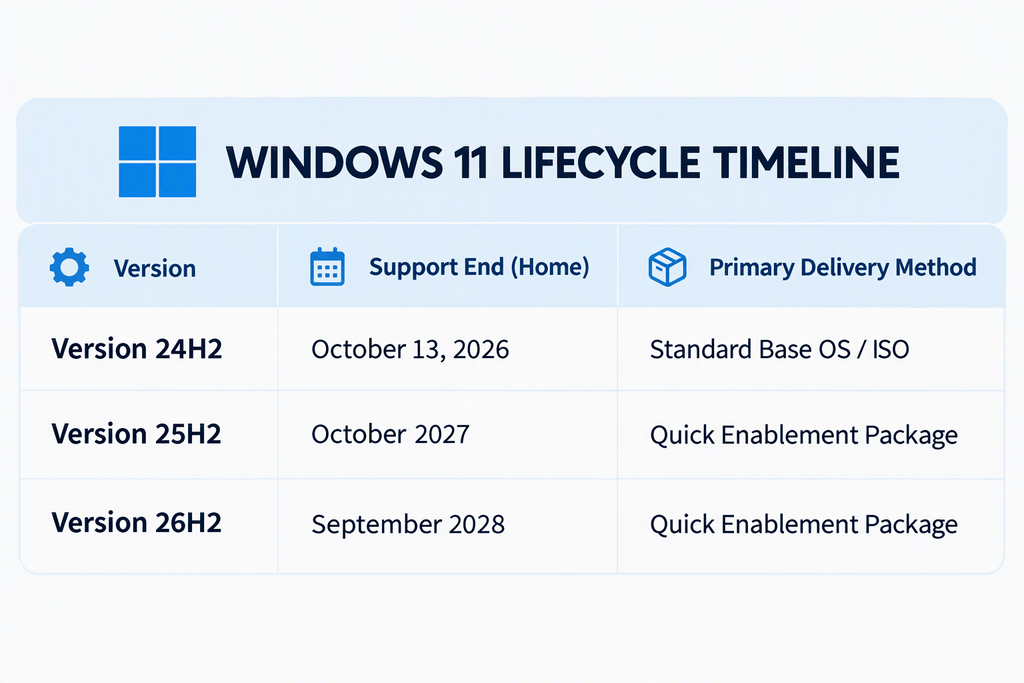
Because 24H2 is reaching its official deadline, continuing to use it poses high security risks. Furthermore, compliance frameworks like Cyber Essentials strictly forbid unpatched operating systems on business networks. Therefore, upgrading your system now is no longer an optional task. Fortunately, moving away from 24H2 is remarkably fast because recent updates use lightweight enablement packages rather than full operating system reinstalls.
⚠️ Warning: Operating an expired Windows build leaves your computer exposed to unpatched zero-day exploits. Additionally, third-party software developers routinely drop support for outdated Windows builds, which eventually breaks critical web browsers and desktop applications.
Why Upgrade to Windows 11 25H2 Right Now?
If you want a thoroughly tested environment, moving to version 25H2 offers an exceptionally stable path forward. Released originally in late 2025, version 25H2 has received an entire year of refined cumulative patches. Therefore, software developers and hardware vendors have already resolved most initial compatibility bugs. You can review all the latest fixes directly through the official Windows Release Health Hub.
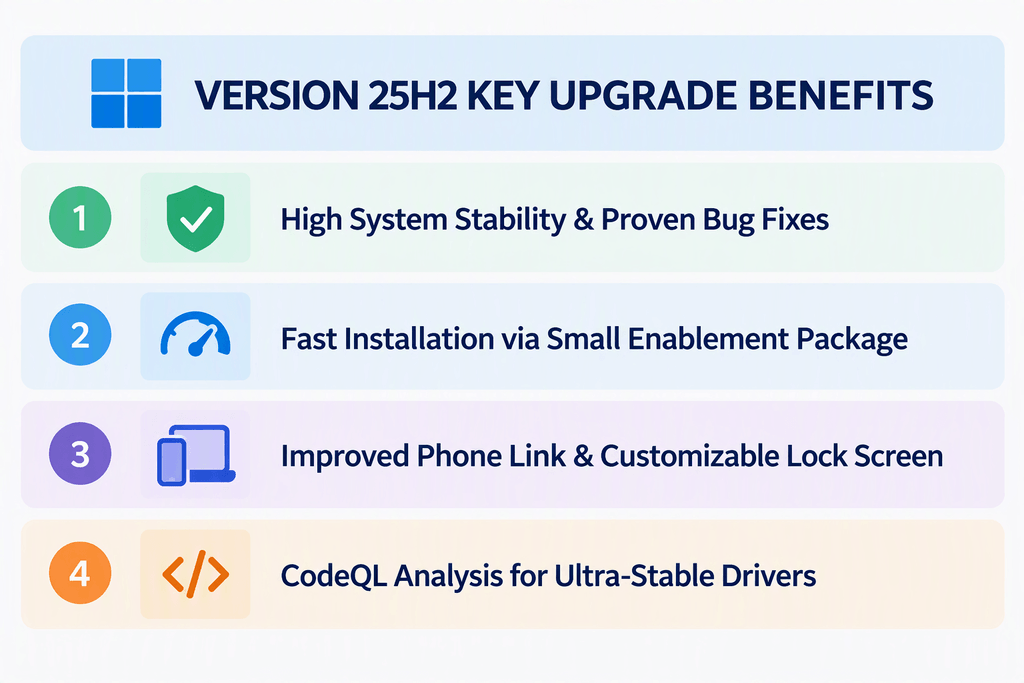
Furthermore, updating to 25H2 takes under five minutes on modern solid-state drives. Because versions 24H2 and 25H2 share the exact same underlying servicing branch, the update downloads as a tiny activation key. Consequently, your system requires only a single quick reboot. Additionally, 25H2 introduces valuable system enhancements, including expanded Start Menu customizations, improved Phone Link stability, and stronger administrator account protections.
- Proven Reliability: Enjoy a fully matured system with zero unexpected feature changes.
- Lightweight Install: Avoid long download waits using the tiny Windows update enablement package.
- Enhanced Security: Gain refined driver protections thanks to mandatory CodeQL static analysis testing.
- Extended Life: Reset your official device support clock until late 2027 immediately.
Is Skipping Ahead to Windows 11 26H2 the Smarter Choice?
Instead of taking an incremental step, many users prefer jumping directly to the latest release. Microsoft officially launched the Windows 11 26H2 Release Update recently as the primary annual feature update. Because 26H2 also services devices via an enablement package, 24H2 machines can transition straight to 26H2 without installing 25H2 first.
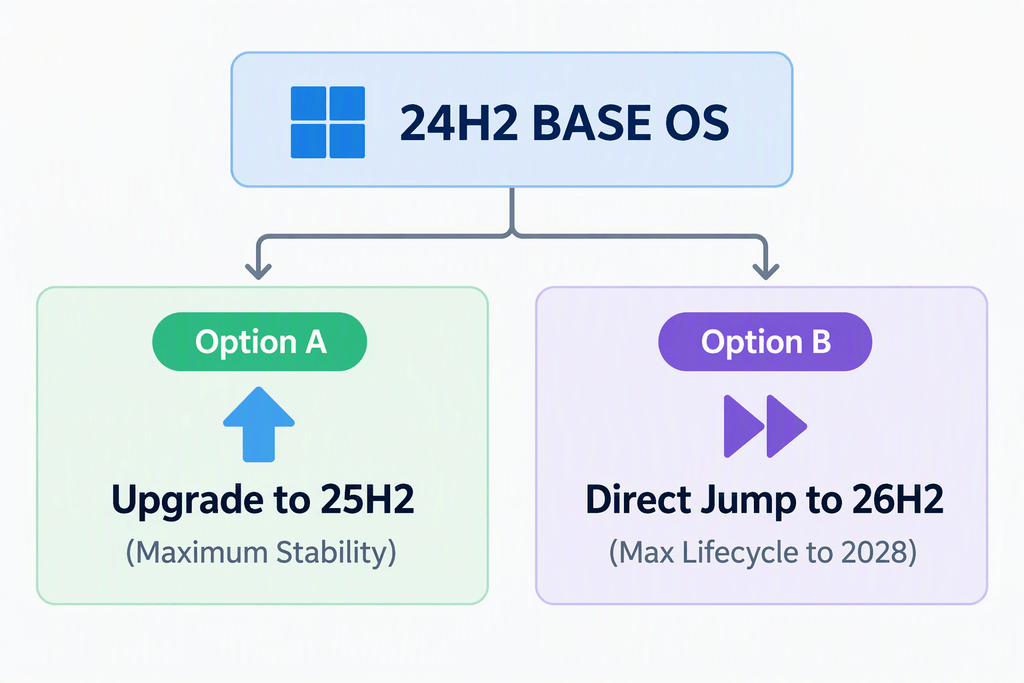
Choosing 26H2 gives you the longest possible support horizon available. Specifically, Home and Pro editions receive full monthly patches all the way through late 2028. Moreover, 26H2 includes innovative management tools like Point-In-Time system recovery, upgraded File Explorer AI helper tools, and automated settings backup for hybrid accounts. Consequently, skipping 25H2 saves IT administrators from scheduling two separate update cycles within a single year.
💡 Pro-Tip: If you manage multiple office PCs, jumping straight to version 26H2 saves significant administrative time. You can easily manage this rollout across your fleet by utilizing centralized tools like Microsoft Intune Autopatch.
Step-by-Step: How to Smoothly Transition Your PC
Upgrading your operating system is simple when you prepare adequately beforehand. First, check your existing version by pressing Windows Key + R, typing winver, and pressing Enter. If your window displays Version 24H2, you should start your update preparation immediately. Follow these concise steps to complete your update:
- Back Up Your Data: Store critical documents on external drives or cloud storage services.
- Free Up Disk Space: Clean out temporary files using the built-in Storage Sense utility.
- Update Security Software: Ensure your third-party antivirus program is fully compatible.
- Open Windows Update: Navigate to Settings > Update & Security > Windows Update.
- Check for Updates: Click the check button to trigger your direct feature update.
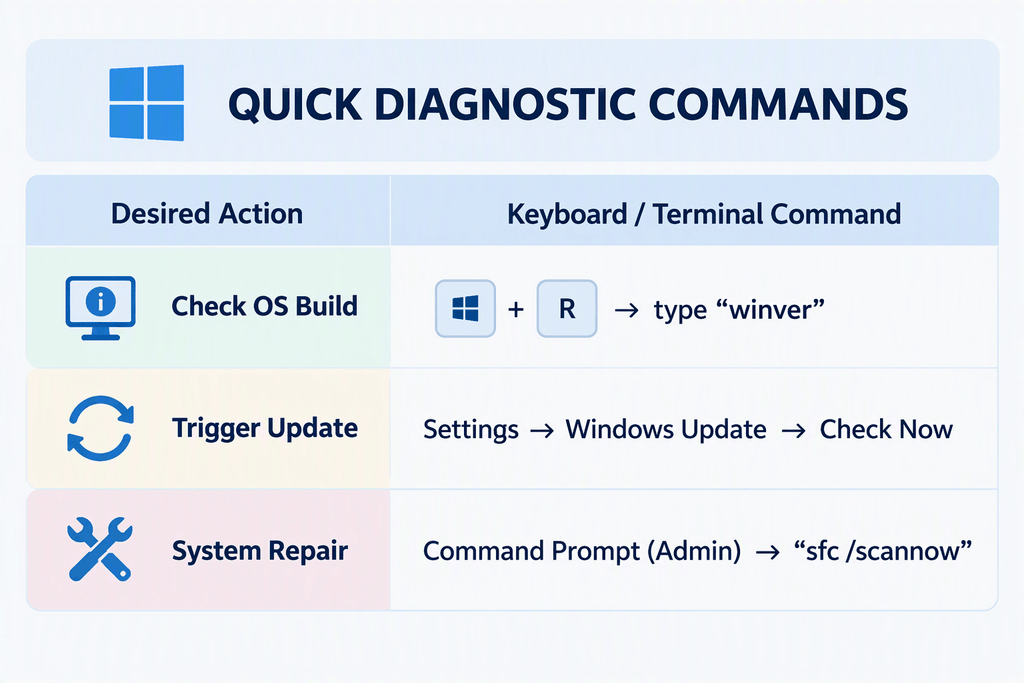
Alternatively, if Windows Update does not show the new build yet, you can download the official media from the Microsoft Software Download Center. Using their installation assistant bypasses common update queue delays safely. Furthermore, if you encounter system errors, running the standard command sfc /scannow in an elevated terminal window usually resolves corrupted update components quickly.
Final Thoughts & Decision Matrix
Ultimately, staying on 24H2 is not a viable long-term strategy. Because Windows 11 end of life dates are strictly enforced, updating your computer ensures optimal performance and maximum data safety. If you prioritize absolute system stability and want zero surprises, you should upgrade to Windows 11 25H2 today. Because it has matured over an entire year, it represents the safest path for mission-critical workstations.
Conversely, if you prefer maximizing your support window while gaining access to fresh management tools, installing the Windows 11 26H2 release directly is clearly your best option. Both paths utilize a fast Windows update enablement package, meaning your upgrade will finish quickly. Choose your target build, perform a quick system backup, and trigger your update today to keep your digital life completely secure!
What build are you currently running on your main desktop? Are you jumping straight to 26H2, or keeping things conservative on 25H2? Leave your thoughts, questions, and deployment experiences in the comments section below, and share this guide with your fellow tech enthusiasts!