
Modern enterprises run on diverse hardware fleets. Consequently, employees rely heavily on macOS, Linux, and custom software stacks every single day. Modern security demands unified governance across every workstation. Historically, security teams struggled when enforcing internal corporate rules on operating systems outside the traditional Microsoft ecosystem. That systemic gap is finally closing today. Microsoft Purview now extends robust Endpoint DLP and native sensitivity labeling capabilities directly to non-Windows apps and third-party software environments.
This major technical update fundamentally changes how organizations manage sensitive digital assets. Now, administrative teams can enforce uniform compliance rules across cross-platform environments without resorting to cumbersome third-party agent add-ons. Furthermore, security architects can restrict unauthorized file transfers, manage cloud exfiltration risks, and extend strict protection rules natively. Let’s examine how this integration operates under the hood, why it matters for your security posture, and how you can deploy it seamlessly across your network.
The Cross-Platform Security Gap
For years, security managers struggled to maintain equal operational visibility on non-Windows endpoints. Windows devices enjoyed deep, OS-level policy enforcement via native system components. Conversely, non-Windows platforms often required separate third-party agents, complex scripts, or restrictive network proxies. Consequently, blind spots naturally formed whenever staff handled sensitive financial spreadsheets, source code, or personal data on alternative operating systems.
This structural asymmetry created significant compliance vulnerabilities for growing companies. Modern users frequently copy confidential text into unsanctioned web tools, consumer generative AI services, or unauthorized cloud storage drives. Traditional boundary controls often fail to stop local actions like printing, taking screenshots, or copying text to external clipboard apps. By expanding native capabilities outward, administrators finally achieve true visibility across all client hardware.
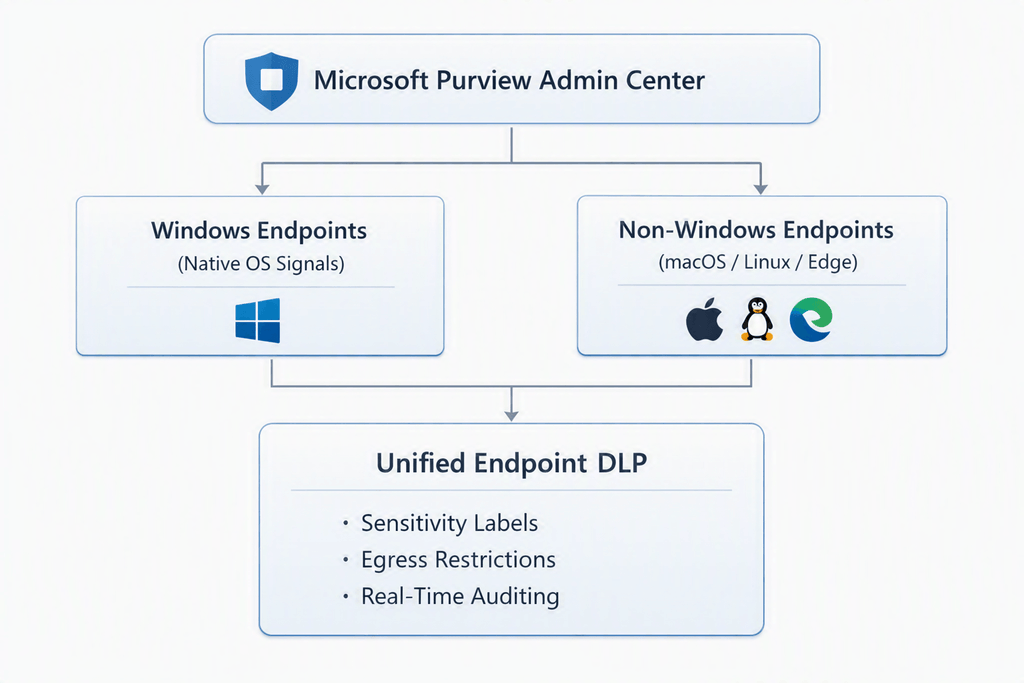
Architectural Mechanics of Extended Endpoint DLP
The revised framework integrates deep within the local application runtime environment. Instead of inspecting raw network packets at the perimeter, local monitoring agents track system calls directly on the host machine. Therefore, the system evaluates user actions before a file leaves a protected directory or enters an unauthorized process space.
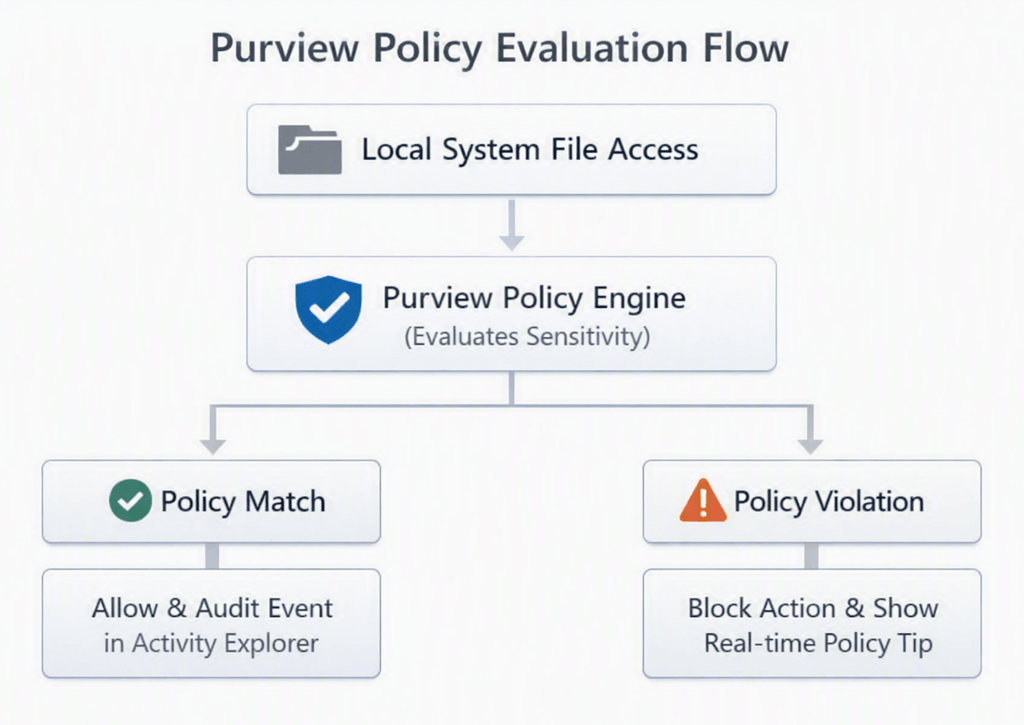
As demonstrated above, the architecture processes file requests locally and enforces instantaneous decisions based on active cloud policies. When employees interact with sensitive data using third-party applications—such as Adobe Creative Cloud, specialized IDEs, or CAD programs—the underlying engine checks active label permissions immediately.
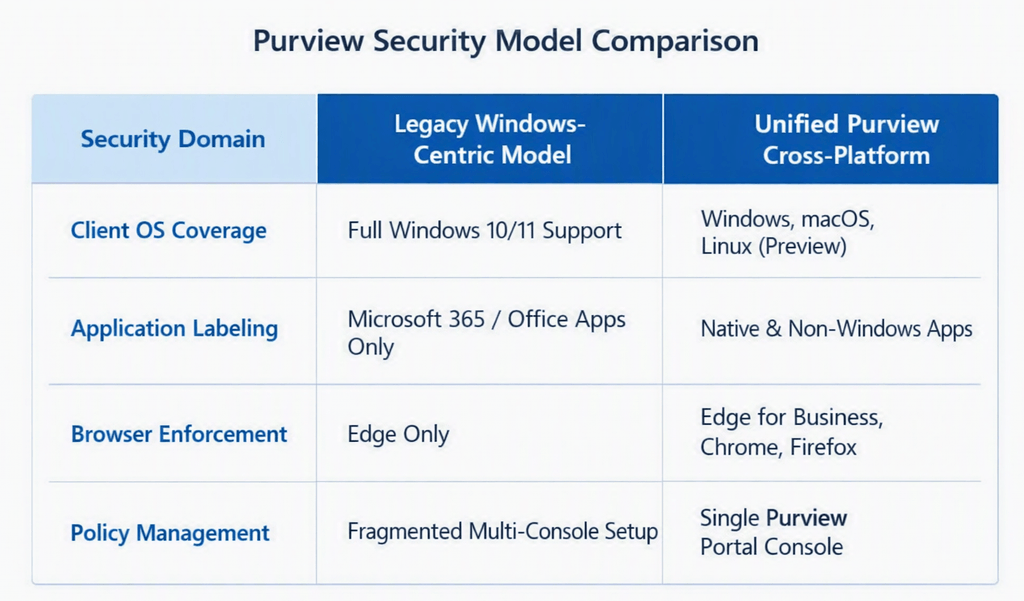
Advanced Sensitivity Labeling Outside Microsoft 365
Sensitivity labels act as durable digital passports for critical internal assets. Previously, opening a encrypted document inside a non-Windows editor often stripped away security metadata entirely. Now, extended SDK integrations ensure that labels persist across file format conversions and cross-platform editing sessions.
- Persistent File Encryption: Protection tags remain bonded to files even when users modify them inside non-Microsoft productivity suites.
- Contextual Access Restrictions: Systems restrict copy, paste, print, and screen-capture actions according to embedded classification headers.
- Automated Label Inheritances: Creating new documents from protected sources automatically propagates existing sensitivity classifications down to child files.
Granular App Control and Egress Restrictions
Uncontrolled application ecosystems present massive data exfiltration risks. Employees frequently drag enterprise assets into unauthorized cloud tools or messaging applications. Under the new framework, administrators define clear application groups directly inside the Microsoft Purview portal.
💡 Pro-Tip: Leverage administrative units within Microsoft Purview to assign granular endpoint policies based on specific regional groups or business units. This approach prevents policy bloat while keeping local compliance requirements tightly aligned.
Step-by-Step Deployment Guide
Deploying cross-platform protection across your endpoint ecosystem requires structured preparation. Follow this sequence to onboard devices and deploy your initial policy set efficiently.
-
Onboard Target Non-Windows Endpoints
Prerequisite: Valid M365 E5 or Purview Suite License.
Deploy the native Microsoft Defender or Purview onboarding package to your macOS or Linux devices. Use your preferred MDM solution, such as Microsoft Intune or Jamf Pro, to push the configuration profiles seamlessly. -
Configure Application Group Categories
Group non-Windows software by trust level.
Navigate to the Microsoft Purview settings portal. Define restricted application groups for third-party PDF readers, graphics tools, and web browsers to establish baseline access controls. -
Define Sensitivity Labels and Protection Scopes
Publish labels to target user groups.
Create or update sensitivity labels within the Information Protection tab. Set file encryption flags, custom watermarks, and user access rights, then publish them to your end-users. -
Build and Test Endpoint DLP Rules
Start in Audit Mode before hard blocking.
Draft a new Data Loss Prevention policy targeting endpoint devices. Configure specific conditions—such as detecting sensitive information types (SITs)—and set initial actions to audit-only to collect telemetry. -
Review Telemetry and Switch to Enforcement
Monitor Activity Explorer for policy hits.
Analyze incoming events inside the Purview Activity Explorer. Fine-tune exclusion lists, then update your rules to block unauthorized egress actions in real time.
⚠️ Warning: Never deploy restrictive block policies directly to production endpoints without an initial audit phase. Immediate blocking can interrupt daily workflows, generate excessive helpdesk tickets, and disrupt legitimate business tasks.
Real-World Use Cases for Modern IT Infrastructure
To understand the operational benefits, consider how this expansion solves common security challenges in modern corporate environments.
Protecting Source Code in Cross-Platform IDEs
Software engineering teams often use specialized text editors and development tools on non-Windows platforms. Historically, auditing source code movement across custom applications was difficult. With expanded non-Windows apps support, administrators can detect when developers accidentally copy sensitive API keys, credentials, or proprietary source code into external generative AI tools or unapproved web repositories.
Securing Creative Assets in Third-Party Software
Design departments handle valuable intellectual property inside non-Microsoft applications like Adobe Creative Cloud. By enforcing native sensitivity labeling, companies ensure that unreleased marketing graphics, CAD schematics, and product specs remain encrypted. If a user attempts to export or share these assets via unapproved channels, local policies intervene immediately.
Evolution of Cross-Platform Purview Protection
The transition toward universal endpoint protection has accelerated significantly over recent years. Tracking these key milestones highlights Microsoft’s long-term strategy for multi-platform governance.
macOS Endpoint DLP General Availability
Microsoft officially releases Purview Endpoint DLP for macOS devices, introducing core file auditing, restrict-app settings, and basic egress controls.
Chrome & Edge Browser Extensions Expansion
Enhanced browser extensions roll out, enabling cross-platform monitoring for file uploads, web paste actions, and cloud service domains.
Just-In-Time Protection & Network Share Groups
Introduces real-time policy evaluation for removable media and local network shares on non-Windows endpoints, preventing accidental exfiltration.
Full Non-Windows App & Generative AI Safeguards
Deep integration expands sensitivity labels and DLP controls across non-Microsoft file types, non-Windows applications, and emerging web SaaS interfaces.
Microsoft Purview Data Loss Prevention Capabilities
Final Thoughts
The expansion of Microsoft Purview into non-Windows app environments marks a major step forward for enterprise data security. By removing traditional operational silos between operating systems, security teams can finally maintain a consistent security posture. The ability to enforce strict sensitivity labels, monitor background file actions, and prevent accidental data loss across all desktop tools greatly reduces compliance risk.
As modern workplaces rely on increasingly diverse software stacks, adopting unified data loss protection is no longer optional. Upgrading your compliance strategies today ensures your proprietary data remains safe, regardless of where or how your team works.
What non-Windows software tools pose the biggest compliance challenges inside your organization? Have you started deploying Purview policies on your alternative endpoints yet? Share your thoughts, setup tips, or questions in the comments below, and don’t forget to share this article with your IT security team!