
Gmail is one of the widely used email account in the world today. It is fast, reliable and most of all, it is free. By default, Gmail comes with cool features that are readily available and is fitting to everyday email needs. With its pack of features, most people don’t even find a need to change how Gmail behaves.
However, Gmail is also a very flexible email system. You can change many things and settings that affects how you use the email service. And one of the features that you can change, that is the subject in this article, is your most busy and dynamic email folder – your Inbox.

From the time of this writing, Google launched its NEW Inbox. The default behavior of this Inbox is described in this Gmail video below.
However, you can configure your Inbox instead of just using the default settings. To configure your Inbox, here are the steps:
- Open your web browser and access http://gmail.com and then sign in to your Gmail account.
- Once signed in, click on the small gear icon at the top right corner of the Gmail window, then click on Settings.
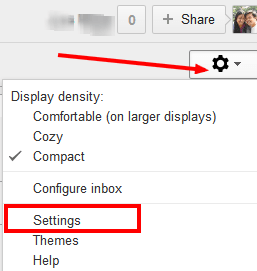
- In the Settings page, click on the Inbox tab. There you shall see the default settings for the New inbox, as shown below:
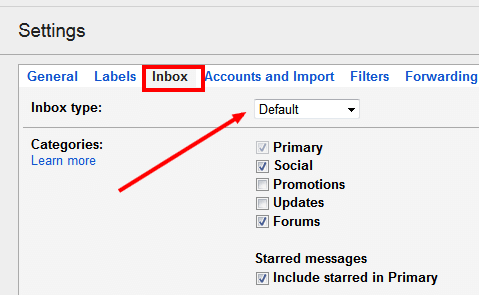
- You can modify the default behaviour by checking and unchecking the check boxes.
- Now, if your goal is for instance, to push unread emails at the very top, you can click on the selection box for Inbox Type and select the appropriate setting as called “Unread First” shown below:
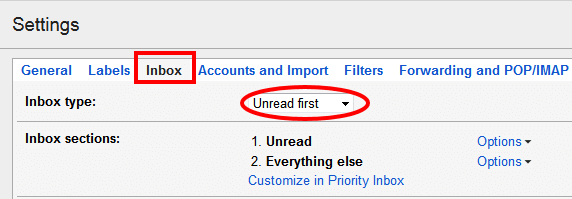
- The “Unread First” Inbox type by its default settings will show all unread emails at the very top and all other emails that are already read will be shown below them.
- If you want to configure further your Inbox, you can select the Inbox Type called Priority Inbox. In this type, you can select your order of proirity for starred emails, important emails and unread emails.
- After making the necessary changes, do not forget to scroll down and click on Save Changes button.
- Your Inbox will then be displayed with the changes you just made.
If you got questions, please leave a comment.