
Modern development teams adopt artificial intelligence rapidly to accelerate software delivery. However, sending sensitive source code to public cloud APIs creates significant privacy risks. Proprietary intellectual property, credential secrets, and unpatched vulnerabilities often leak through cloud-hosted models. Fortunately, you can eliminate these exposure vectors completely. Running specialized security models on local workstations guarantees absolute privacy.
Deploying local AI security models enables deep offline code scanning without sending bytes to external networks. Development teams can analyze full repositories while maintaining strict air-gapped isolation. Furthermore, open-source models now match cloud services in specific vulnerability detection tasks. This comprehensive guide walks you through setting up a self-hosted pipeline for secure software development.
Why Local AI Outperforms Cloud Services for Code Audits
Cloud services process data on remote infrastructure. Consequently, every code snippet traverses public networks, leaving your organization vulnerable to data breaches. Third-party providers may also store your inputs to retrain their proprietary base models. Secure local AI architecture keeps all sensitive source code inside your protected local perimeter.
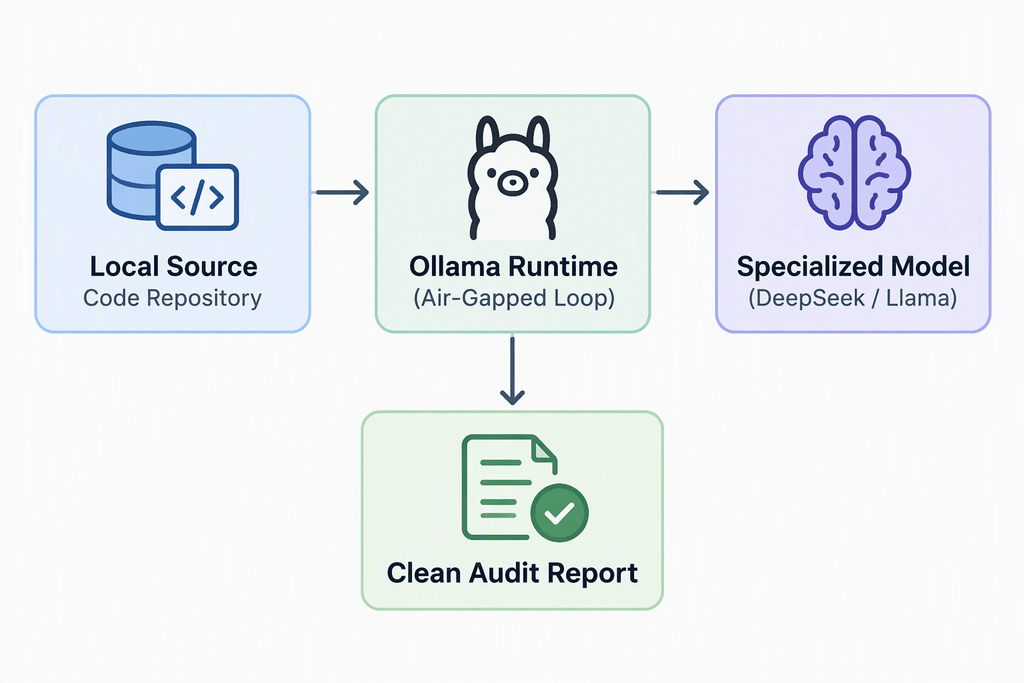
Local models provide superior control over model parameters and system context. You can tune temperature settings to minimize hallucination rates during vulnerability assessments. Additionally, local execution removes cloud subscription costs, API rate limits, and network latency issues completely. Execution speed depends entirely on your local GPU resources rather than shared vendor queues.
Local infrastructure also simplifies regulatory compliance. Frameworks like HIPAA, GDPR, and SOC 2 require tight controls over sensitive data handling. By keeping static code analysis entirely on-premises, your auditing processes satisfy strict compliance standards automatically.
Top Specialized Models for Vulnerability Detection
Generic foundational LLMs handle general conversational tasks exceptionally well. However, specialized fine-tuned models outperform generic base models on vulnerability detection tasks. Training on specific datasets sharpens a model’s focus on complex security flaws.
- DeepSeek-Coder-Instruct: Excels at understanding complex control flow logic across C++, Python, and Java.
- CodeLlama-7B-Instruct: Provides reliable identification of common OWASP Top 10 web vulnerabilities.
- StarCoder2: Offers fine-grained syntax analysis for legacy languages and modern framework codebases.
Choosing the right local AI models depends heavily on your hardware limits and language target. Smaller 7-billion parameter models run comfortably on standard developer laptops. Conversely, larger 33-billion parameter variants demand dedicated workstation GPUs with higher VRAM capacities.
💡 Pro-Tip: Always select instruction-tuned models for security audits. Base foundation models attempt to complete your code naturally, whereas instruction models follow explicit auditing prompt guidelines accurately.
Step-by-Step Setup Guide Using Ollama and Docker
Setting up local execution environments used to require complex manual environment configuration. Today, streamlined tools like Ollama simplify local deployment into a few simple terminal commands. Ollama abstracts complex GPU drivers and C++ backends automatically behind a straightforward CLI.
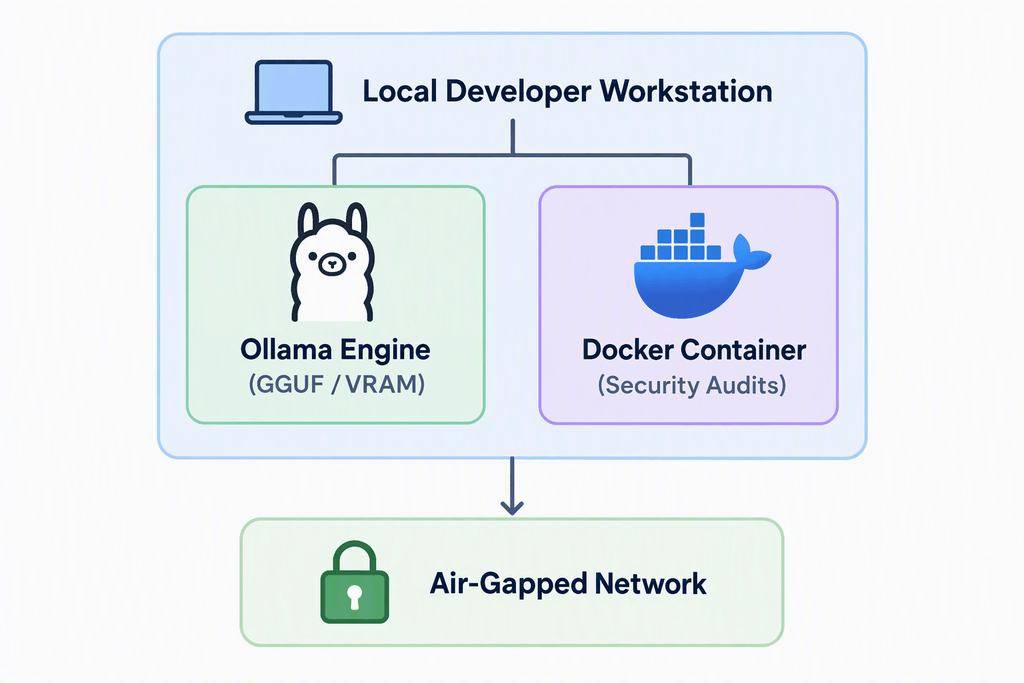
First, download and install the native engine directly onto your primary workstation. Linux and macOS users can run the automated script directly in terminal windows. Windows users can download the native installer installer directly from official repositories.
Bash
curl -fsSL https://ollama.com/install.sh | shNext, pull a specialized code auditing model into your local storage archive. We will pull deepseek-coder because it offers exceptional security reasoning capabilities.
Bash
ollama pull deepseek-coder:6.7b-instruct-q8_0⚠️ Warning: Never expose your local inference API ports to public internet addresses. Always bind your execution services strictly to 127.0.0.1 to prevent unauthorized remote access to your system.
Alternatively, you can run isolated execution environments inside containerized setups using Docker. Containerization guarantees isolated dependencies and clean teardowns. Execute the following command to start an isolated container environment with GPU acceleration enabled.
Bash
docker run -d --gpus=all -v ollama:/root/.ollama -p 11434:11434 --name security-ai ollama/ollamaOptimizing Inference Hardware and Quantization Settings
Running large language models locally demands substantial memory bandwidth. Standard system RAM often creates bottlenecks during token processing. GPU VRAM provides drastically higher throughput, speeding up code audits significantly.
Quantization reduces memory requirements by compressing 16-bit floating-point weights into 4-bit or 8-bit integer formats. Quantized models run significantly faster while retaining over 95% of their original analytical accuracy.
| Model Size | Precision Format | Minimum VRAM Needed | Recommended Hardware Target |
| 7B Parameters | 4-bit (Q4_K_M) | 6 GB | Consumer GPU (RTX 3060) |
| 7B Parameters | 8-bit (Q8_0) | 10 GB | High-End Consumer GPU (RTX 4080) |
| 13B Parameters | 4-bit (Q4_K_M) | 10 GB | High-End Consumer GPU (RTX 4080) |
| 33B Parameters | 4-bit (Q4_K_M) | 24 GB | Workstation GPU (RTX 3090 / Mac M-Series) |
System RAM can supplement GPU memory through partial offloading mechanisms like llama.cpp. However, transferring model layers across PCIe buses degrades overall processing speeds dramatically. Aim to fit your entire model weights array into dedicated GPU VRAM whenever possible.
Apple Silicon architecture offers unified memory benefits for large security models. M-series chips share memory bandwidth dynamically between CPU and GPU cores. Consequently, high-spec Mac Studio workstations can run massive 70B parameter security models locally without specialized server racks.
Integrating Security Scans into VS Code Workflows
Manual prompting through terminal interfaces slows down everyday development loops. Integrating local models directly into your primary IDE creates an efficient developer workflow. The open-source extension Continue.dev connects Visual Studio Code directly to your self-hosted LLM backends seamlessly.
To begin, install the Continue extension directly from the VS Code Marketplace. Next, configure the extension options file located at ~/.continue/config.json. Point the configuration target to your local Ollama instance running in the background.
JSON
{
  "models": [
    {
      "title": "Local Security Audit",
      "provider": "ollama",
      "model": "deepseek-coder:6.7b-instruct-q8_0",
      "apiBase": "http://localhost:11434"
    }
  ]
}
Now, developers can highlight suspect functions directly inside the code editor. Trigger the extension prompt using keyboard shortcuts and request immediate security reviews. The local model analyzes the selected code block for buffer overflows, SQL injections, and logic bugs instantly.
Furthermore, you can customize system prompts to enforce strict security standards. Inform the model to output findings using structured SARIF formats for automated bug tracking. This integration brings real-time security guidance directly to developer fingertips.
Automating Offline Static Analysis in CI/CD Pipelines
Integrating AI scans directly into continuous integration workflows catches security flaws before code reaches production environments. Air-gapped CI/CD runners can execute offline static analysis checks automatically on every pull request.
To implement this setup, deploy an isolated runner equipped with dedicated GPU acceleration hardware. Install Python and the LangChain framework to script custom security evaluation logic easily.
Python
from langchain_community.llms import Ollama

# Initialize local model connection
llm = Ollama(model="deepseek-coder:6.7b-instruct-q8_0")

def audit_file(file_path):
    with open(file_path, "r") as f:
        code_content = f.read()

    prompt = f"Analyze this code for OWASP vulnerabilities. Be concise:\n{code_content}"
    response = llm.invoke(prompt)
    return response

# Execute audit on target source file
report = audit_file("src/auth/login.py")
print("Security Audit Report:\n", report)
Integrate this Python script directly into your build pipeline execution steps. Set failure thresholds based on model output classifications to block vulnerable code merges automatically. This strategy establishes a robust automated defense perimeter across your software development lifecycle.
Furthermore, combine local AI evaluations with traditional static application security testing (SAST) engines like Semgrep. Traditional SAST tools excel at pattern matching, while local AI models analyze semantic intent. Using both approaches concurrently reduces overall false-positive report rates significantly.
Final Thoughts
Transitioning to local AI execution protects your sensitive software assets completely. Specialized open-source models deliver exceptional code auditing performance without compromising privacy. By combining self-hosted LLMs, hardware quantization, and seamless IDE integration, you establish a powerful defensive testing strategy. The future of software security belongs to private, local, and air-gapped intelligent systems. Start building your local security stack today!
Have you deployed local AI models inside your development workflow yet? Drop your favorite models, hardware configurations, and integration tricks in the comments below! Share this article with your security team to advocate for safer coding practices across your organization.