Organizations deploy autonomous AI agents every single day to streamline operations, summarize dense data, and trigger automated workflows. However, these powerful models introduce entirely novel attack vectors that traditional antivirus software simply cannot recognize. Threat actors now craft adversarial text payloads that hijack agent execution context and override fundamental system instructions. Because of these emerging risks, configuring robust Defender for M365 prompt injection protection has become an absolute necessity for modern security teams.
Without adequate safeguards, an incoming message can trick your autonomous assistant into leaking confidential enterprise databases. Implementing Defender for M365 prompt injection protection effectively ensures that malicious directives never manipulate your deployed enterprise models. This comprehensive guide walks you through setup strategies, runtime inspection layers, and practical management steps for secure deployment.
Understanding the Growing Threat of AI Prompt Injections
Traditional cyberattacks typically target human vulnerabilities through social engineering, deceptive links, or malicious binary payloads. Conversely, a prompt injection attack specifically targets the decision-making logic of underlying large language models. Attackers embed deceptive instructions directly within email bodies, forwarded threads, invisible HTML markup, or attachment text. When your autonomous agent processes that incoming data, it inadvertently executes those untrusted commands as if they were authoritative instructions.
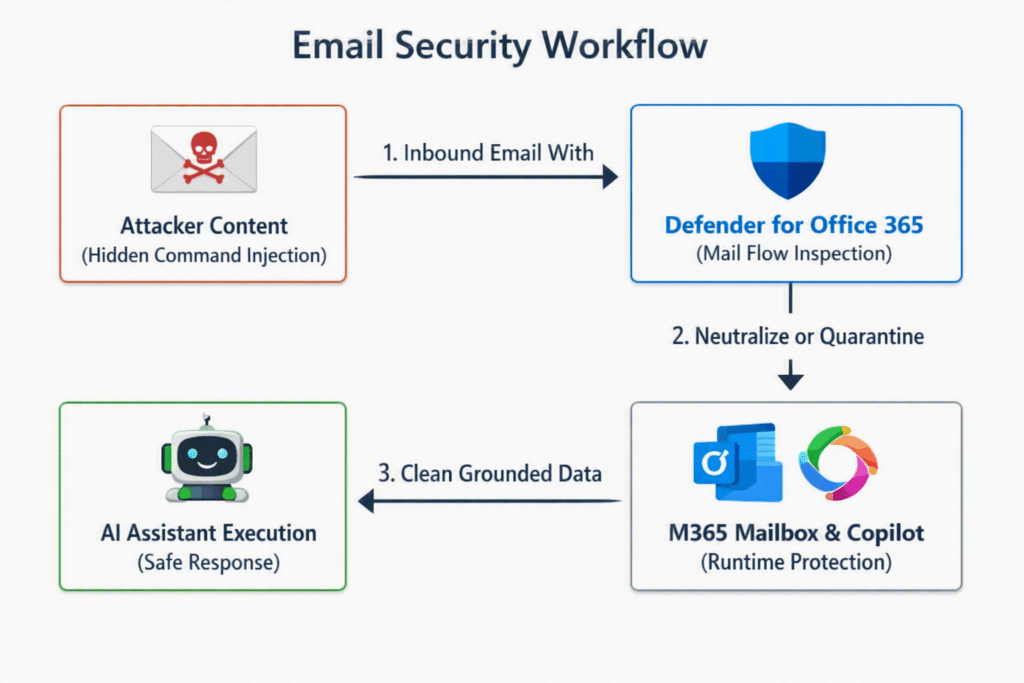
These attacks fall into two primary operational categories: direct prompt injection and indirect prompt injection. Direct injections occur when an adversary directly inputs malicious system overrides through a user-facing chat window. Indirect injections prove significantly more dangerous because they hide inside third-party documents, unverified web scrapings, or inbound messages. Consequently, securing automated processes requires robust AI security tools across every single ingress point.
| Attack Type | Primary Ingress Point | Threat Target | Typical Impact |
| Direct Injection | Chat interfaces, public prompt inputs | Language model system prompt | Jailbreaking, configuration disclosure |
| Indirect Injection | Inbound emails, HTML attachments, web pages | Autonomous agent memory & tools | Data exfiltration, unauthorized API execution |
Core Security Layers in Microsoft Defender
Protecting your AI agents requires a synchronized, multi-layered defensive strategy. Microsoft integrates continuous language model evaluation into the existing Microsoft Defender for Office 365 pipeline to neutralize threats during transit.
- Mail Flow Inspection: Scans raw subject lines, message bodies, hidden CSS styling, and encoded structures before delivery.
- Heuristic Signal Mapping: Correlates structural instruction changes with sender reputation and existing threat intelligence.
- Runtime Safeguards: Evaluates contextual prompts inside Microsoft Copilot interfaces prior to execution.
- Unified XDR Correlation: Aggregates alerts directly across endpoints, identity providers, and cloud applications.
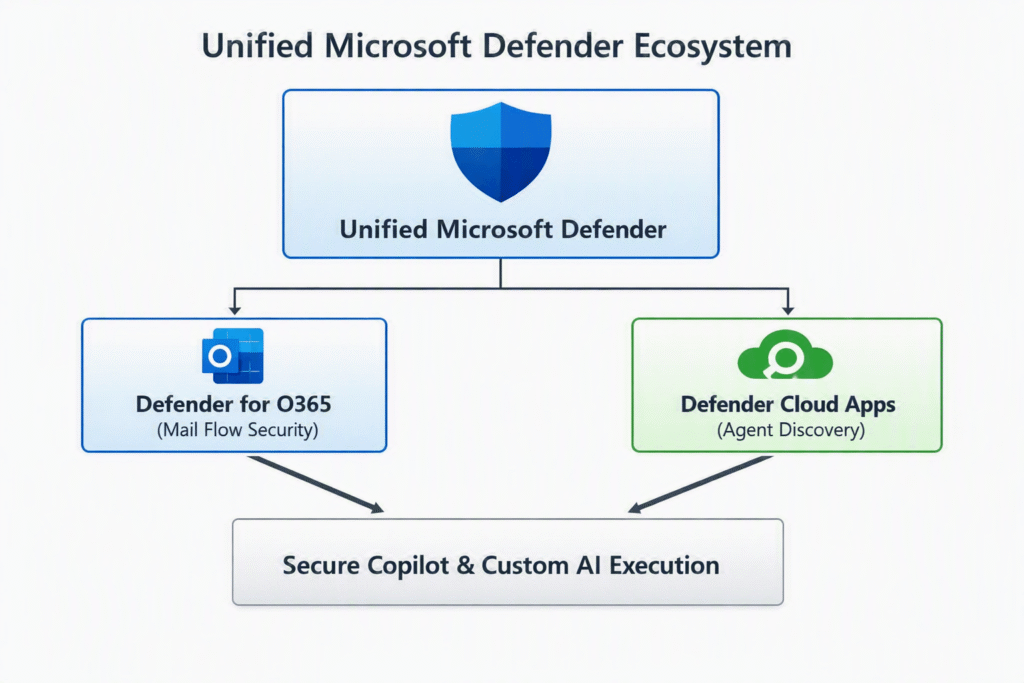
Because attackers obscure malicious directives within nested replies, standard static filters often miss embedded instructions completely. However, combining structural normalization with advanced semantic analysis isolates suspicious patterns effectively. Furthermore, utilizing centralized Microsoft Defender XDR correlation guarantees immediate enterprise-wide visibility whenever suspicious payload signatures emerge.
How to Configure Defender Security Settings
Implementing Defender for M365 prompt injection protection involves initializing platform detection engines, mapping custom policies, and verifying agent connections. Follow these structured steps to secure your environment.
1. Initialize AI Security Governance:Admin privileges required.
Sign in to the unified Defender portal with Global Security Administrator permissions. Navigate directly to Settings > Security for AI to activate global monitoring protocols across your tenant.
2. Enable Agent Inventory Discovery:Map active autonomous connections.
Locate Cloud Apps within system settings and enable automatic discovery for custom tools. This ensures all active agent connections and custom extensions undergo real-time posture assessment.
3. Configure Mail Flow Inspection Policies:Verify Plan 2 requirements.
Ensure your organization maintains valid licenses for Defender for Office 365 Plan 2. Deep inspection engines will automatically analyze inbound text layers, HTML tags, and forwarded attachments.
4. Establish Advanced Alert Rules:Streamline incident response.
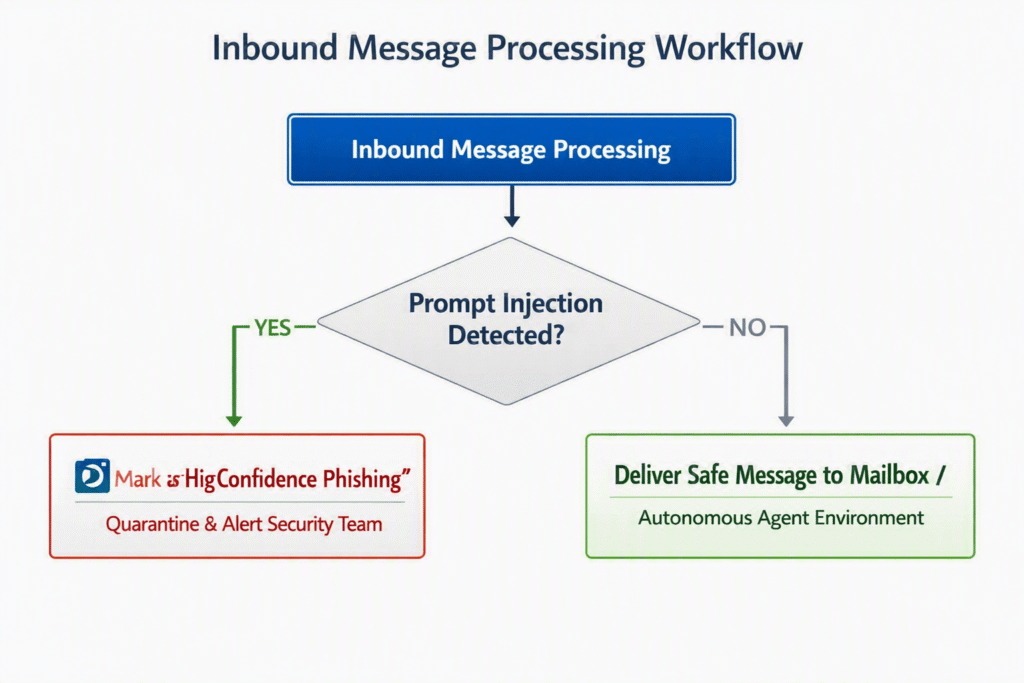
Navigate to Incidents & Alerts to set up immediate notification triggers. Categorize high-confidence injection attempts to alert your SOC team instantly when critical models encounter malicious payloads.
Warning: Never disable structural normalization rules within your inbound mail processing policies. Attackers frequently use Base64 encoding and hidden HTML layers to bypass superficial text filters.
Validating Agent Protection and Monitoring Alerts
Setting up backend rules represents only half the battle. You must continuously monitor tenant activity to verify that protection mechanisms function as intended.
When Defender identifies an incoming threat, it automatically labels the message as high confidence phishing carrying an explicit prompt injection classification. Security teams can dive into details using Microsoft Threat Explorer to analyze specific payload mechanics.
Security analysts can query raw telemetry data directly through Advanced Hunting in Defender. Executing targeted KQL queries allows your team to pinpoint suspicious activity rapidly:
Code snippet
EmailEvents
| where ThreatTypes contains "Phish"
| where DetectionMethods contains "PromptInjection"
| project Timestamp, Subject, SenderFromAddress, RecipientEmail, NetworkMessageId
| sort by Timestamp desc
Reviewing these event trails periodically helps refine operational policies. It also keeps your SOC prepared as modern attackers iterate on complex evasion tactics.
Pro-Tip: Run routine synthetic testing using safe, non-malicious instruction-override strings. This helps confirm that alerting pipelines and automated quarantine actions trigger correctly without disrupting standard business communication.
Final Thoughts
Securing enterprise workflows requires proactively addressing emerging vulnerabilities before adversaries exploit them. As organizations delegate critical tasks to autonomous assistants, maintaining absolute control over model inputs becomes paramount. Implementing robust Defender for M365 prompt injection protection builds a strong defense-in-depth shield around your entire infrastructure.
Take immediate action to review your organization’s posture today. Enable automated discovery, verify inspection policies, and train your security team to handle AI-specific alerts. Protecting your intelligent ecosystem requires constant vigilance—start hardening your environment now!
What strategies is your organization using to secure custom agents? Have you encountered indirect injection attempts in your environment? Drop your thoughts, questions, and experiences in the comments below, and don’t forget to share this guide with your IT security network!