Is your once-snappy computer now crawling through simple tasks? You do not need to buy a brand-new machine to regain peak performance. In 2026, many users find that an old laptop still possesses incredible potential with a few minor adjustments. By focusing on laptop performance and affordable DIY fixes, you can extend the life of your device significantly. This guide will walk you through essential hardware and software steps. You will learn to save money while enjoying a much faster user experience. Let us dive into these cost-effective strategies.
Affordable DIY RAM Upgrades for Multitasking
One of the most effective ways to boost speed is a laptop RAM upgrade. Random Access Memory acts as the short-term memory for your computer. When you open many browser tabs or apps, your RAM fills up quickly. Consequently, the system slows down as it struggles to manage data. Most older laptops allow you to add more memory easily. You should first check if your laptop has an open slot.
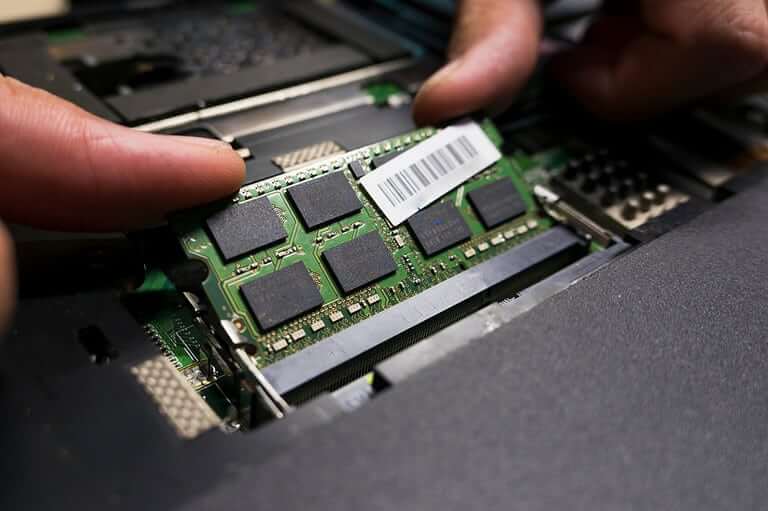
To perform this upgrade, first identify the correct RAM type for your model. Crucial offers a helpful system scanner tool to find compatible parts. Once you have the sticks, power down your device and remove the battery. Open the back panel and firmly click the new RAM into place. This simple hardware change allows your laptop to handle modern software much better. You will notice an immediate difference in how quickly programs respond.
Switch to a Solid State Drive (SSD)
If your laptop still uses a mechanical hard drive, it is likely the primary bottleneck. Traditional hard drives use spinning platters that move slowly. Replacing this with a laptop SSD upgrade is a total game-changer for speed. Solid State Drives have no moving parts and access data almost instantly. This upgrade can make an old machine boot in seconds rather than minutes. Even a budget SSD provides a massive leap in responsiveness.
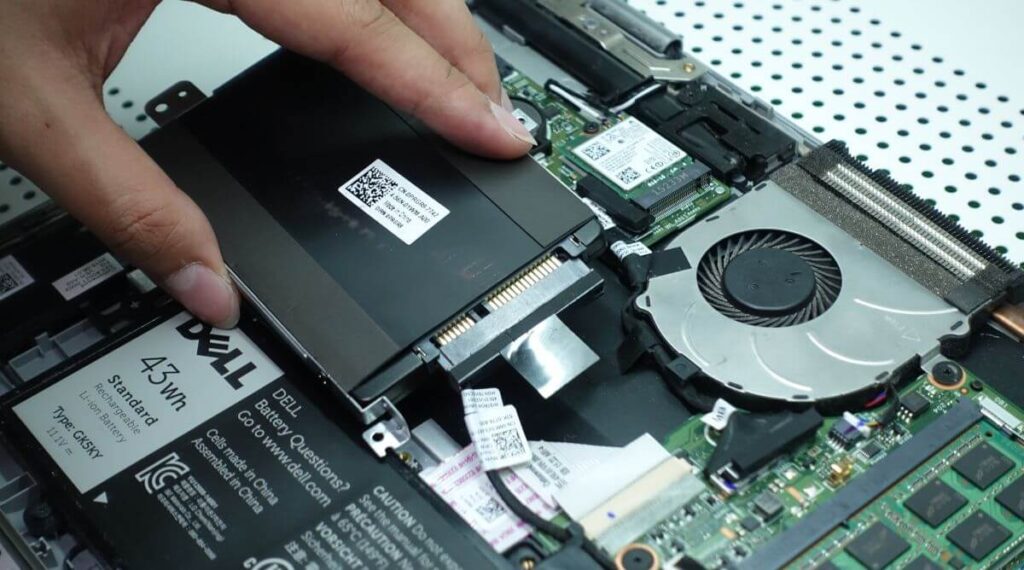
You can find highly-rated, affordable drives from brands like Samsung or Western Digital. Before you swap the drives, you must clone your existing data. Software like Macrium Reflect can help you transfer your files safely. After cloning, simply unscrew the old drive and slide in the new SSD. This is arguably the most impactful DIY solution for any aging computer. Your laptop will feel like a premium, modern machine again.
Master the Software Cleanup for Peak Speed
You do not always need hardware to see results. A thorough laptop software cleanup can remove “digital debris” that drains resources. Start by opening your Task Manager to see which programs launch at startup. Disable any apps that you do not need immediately upon booting. This action reduces the load on your processor right from the start. Next, uninstall bloatware or old programs that you no longer use.
Windows users should also utilize the built-in Disk Cleanup tool to purge temporary files. This process frees up valuable space and helps the operating system run more efficiently. Additionally, ensure your drivers and OS are fully updated. Developers often release patches that optimize performance and fix bugs. If your system still feels sluggish, consider a fresh Windows installation for a truly clean slate.
Physical Maintenance and Thermal Care
Dust is a silent killer of speed. Over time, fans and vents collect debris that traps heat inside. When a laptop gets too hot, it slows down its processor to prevent damage. This “thermal throttling” makes your computer feel incredibly laggy. Therefore, you should use a can of compressed air to blow out the vents. This simple maintenance step keeps your components cool and running at their intended speeds.
For more advanced DIYers, reapplying thermal paste can offer even better results. This paste sits between your processor and the cooling system. Over years of use, it can dry out and lose effectiveness. Replacing it ensures that heat transfers away from the CPU efficiently. Combine this with a laptop cooling pad for the best thermal management. Keeping your hardware cool is the easiest way to maintain consistent performance.
Final Thoughts on Laptop Revitalization
Boosting your laptop’s speed does not require a huge investment. By combining hardware upgrades like RAM and SSDs with smart software maintenance, you can transform your device. These DIY solutions provide professional results at a fraction of the cost of a new PC. Your old laptop still has plenty of life left in it. Take the time to apply these fixes and enjoy a faster, smoother experience today.
Did these tips help your laptop run faster? Tell us which upgrade made the biggest difference in the comments below!