In 2025, every Windows user needs reliable tools to enhance productivity, security, and entertainment. Thankfully, some of the most powerful software available today is completely free. Whether you use your PC for work, school, gaming, or creative projects, the right free software can make a huge difference.
From PC optimization tools to creative design apps, we’ve rounded up the top 10 free programs you should install immediately. These tools are safe, well-supported, and frequently updated to meet modern computing needs.
1. LibreOffice – Best Free Office Suite
LibreOffice is a powerful, open-source alternative to Microsoft Office. It includes Writer, Calc, Impress, and other essential apps. You can edit Word, Excel, and PowerPoint files without paying a dime.
This suite supports hundreds of file formats and works offline, making it perfect for students and professionals. Download LibreOffice from the official site.
2. VLC Media Player – The Ultimate Media Playback Tool
VLC Media Player supports nearly every audio and video format out there. It’s lightweight, fast, and free from ads.

You can stream online content or play DVDs and Blu-rays without needing extra codecs. Grab it now at the VLC website.
3. Malwarebytes – Reliable Free Malware Protection
Windows Defender works well, but pairing it with Malwarebytes gives added protection. Malwarebytes detects and removes spyware, ransomware, and malicious websites.
Its free version provides on-demand scanning and malware cleanup. For regular scanning, download it from Malwarebytes.
4. CCleaner – Easy System Cleanup and Optimization
Even with improvements in Windows 11, temporary files still clog up space. CCleaner cleans your registry, cache, and junk files effectively.
It also offers browser cleaning and startup management. Get the free version from Piriform.
5. GIMP – Best Free Photo Editing Tool
GIMP is a powerful open-source image editor for designers, photographers, and hobbyists. It supports layers, brushes, and advanced photo editing features.
It’s a free alternative to Adobe Photoshop. Download GIMP from the official GIMP site.
6. 7-Zip – Lightweight File Compression Tool
7-Zip compresses and extracts almost any file format including ZIP, RAR, and 7z. It’s faster and more efficient than Windows’ built-in compression.
This tool is essential for managing large files or installing software. Get it free at 7-Zip.org.
7. Audacity – Free Audio Recorder and Editor
Audacity is perfect for editing podcasts, recording music, or cleaning up audio. It’s user-friendly and packed with advanced audio features.
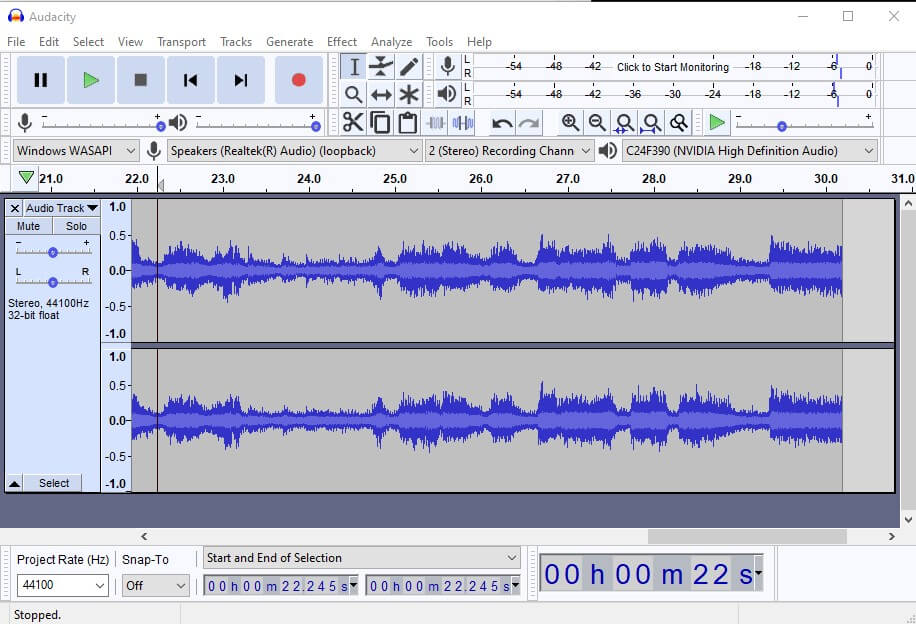
Many YouTubers and musicians rely on it. Download Audacity from the official website.
8. ShareX – Powerful Screen Capture and Recording Tool
ShareX goes beyond basic screenshots. It records videos, captures scrolling pages, and uploads directly to cloud services.
This open-source app is perfect for tutorials, documentation, and presentations. Try it at the ShareX site.
9. Brave Browser – Secure and Fast Alternative to Chrome
Brave is a Chromium-based browser that blocks ads and trackers by default. It loads pages faster and uses fewer system resources.
Additionally, it supports Chrome extensions. Download it from the Brave browser homepage.
10. Notepad++ – Advanced Text Editor for Coders and Writers
Notepad++ is a must-have for developers, writers, and editors. It supports multiple programming languages and advanced text formatting.
It’s lightweight and doesn’t slow down your system. You can install it from Notepad++.
Final Thoughts
Installing these free tools can dramatically improve your Windows experience in 2025. They’re safe, frequently updated, and tailored to real-world needs.
Which one is your favorite? Did we miss a tool you can’t live without? Let us know in the comments!