In today’s fast-paced digital world, staying productive online can be challenging. Distractions are everywhere, from social media to overflowing tabs. However, browser extensions can help you take control and focus better. These handy tools work directly in your browser and can save you hours each week.
Whether you’re managing emails, organizing tasks, or blocking distractions, extensions are your secret weapon. Two of the most searched tools in digital workspaces—task management and time tracking—are now more accessible through browser extensions. With just a few clicks, you can streamline your work, reduce procrastination, and boost performance. Let’s dive into the top 10 browser extensions that can truly transform your productivity.
1. Todoist – Task Management Made Simple
Todoist is a popular task management extension. It helps you organize your to-do lists across devices. You can set priorities, due dates, and reminders.

This tool also integrates with Gmail, Outlook, and more. It’s perfect for keeping tasks in one place without switching tabs. Learn more at Todoist’s official site.
2. StayFocusd – Eliminate Time-Wasting Sites
If you often get distracted on social media, StayFocusd is a lifesaver. This extension limits the time you spend on specific websites.

You can block or restrict sites during work hours. Therefore, you stay focused and reduce idle browsing. Visit StayFocusd on Chrome Web Store.
3. Momentum – Your Personalized Productivity Dashboard
Momentum replaces your new tab page with an inspiring dashboard. It features to-do lists, daily quotes, weather, and a calming background.
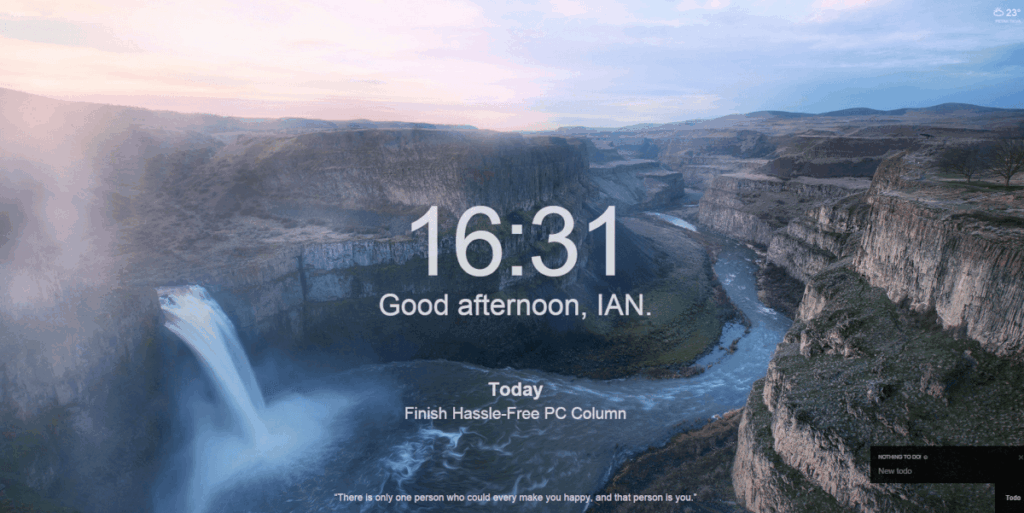
With a focus on mindfulness, it reminds you of your daily goal. This keeps your intentions clear throughout the day. Try it via Momentum’s homepage.
4. Clockify – Accurate Time Tracking in Your Browser
Clockify is one of the best time tracking tools. You can use it directly in your browser to track tasks and projects.

It’s ideal for freelancers, remote workers, and teams. You can generate reports and analyze productivity over time. Explore more on Clockify’s site.
5. Grammarly – Smarter, Faster Writing Anywhere
Grammarly enhances your writing by checking grammar, tone, and clarity in real time. It works in emails, documents, and messaging platforms.
The extension is helpful for both casual users and professionals. Better writing can lead to clearer communication and saved time. Learn more on Grammarly’s official website.
6. Tab Wrangler – Keep Your Browser Clean and Fast
Tab Wrangler helps close inactive tabs automatically. This keeps your browser uncluttered and improves performance.
It’s especially useful if you keep too many tabs open. The extension stores closed tabs, so nothing gets lost. Check out Tab Wrangler on GitHub.
7. OneTab – Save Memory, Save Time
OneTab is a powerful extension for managing multiple tabs. It converts all your open tabs into a single list.
This saves memory and reduces distractions. You can restore tabs individually or all at once. Visit OneTab’s official site.
8. Evernote Web Clipper – Organize Ideas Instantly
Evernote Web Clipper lets you save articles, images, and bookmarks from the web. You can organize clippings into notebooks with tags.

It’s perfect for research, planning, or gathering inspiration. Everything syncs with your Evernote account. Try it via Evernote’s official page.
9. RescueTime – See Where Your Time Really Goes
RescueTime runs in the background and tracks your time on websites and apps. It then provides detailed reports on how you spend your time.

You’ll learn which sites hurt your productivity most. From there, you can set goals to work smarter. Learn more at RescueTime’s homepage.
10. Loom – Communicate Faster with Video
Loom lets you record video messages from your browser. You can explain tasks, share updates, or give feedback without scheduling meetings.

This is especially useful for remote teams. It saves time and improves clarity. Try it at Loom’s website.
Conclusion
These ten browser extensions can significantly enhance how you work online. Whether you’re aiming to organize tasks, manage time, or reduce digital clutter, there’s a tool for you. Many are free and easy to install. Start with one or two and see how your productivity improves.
The right extension can make a big difference in your day-to-day workflow. So, take control of your browser and make it work for you—not against you.